Loading
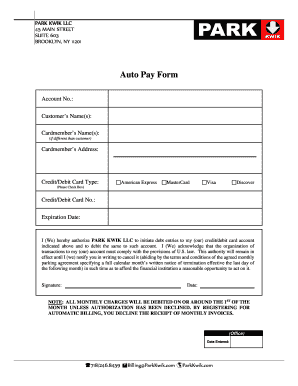
Get Auto Pay Form - Park Kwik
How it works
-

Open form follow the instructions
-

Easily sign the form with your finger
-

Send filled & signed form or save
How to fill out the Auto Pay Form - Park Kwik online
Filling out the Auto Pay Form for Park Kwik online is a straightforward process that allows you to set up automated billing for your parking fees. This guide will provide you with step-by-step instructions to ensure you complete the form accurately and efficiently.
Follow the steps to successfully complete the Auto Pay Form.
- Press the ‘Get Form’ button to access the Auto Pay Form and open it in your preferred editor.
- In the Account No. field, enter your unique account number associated with Park Kwik.
- Fill in the Customer's Name(s) field with the name of the individual or individuals who hold the parking account.
- If the cardmember's name differs from the customer's name, enter it in the Cardmember's Name(s) field.
- Provide the Cardmember's Address, ensuring it is accurate for billing purposes.
- Select the type of Credit/Debit Card you will be using by checking the appropriate box (American Express, MasterCard, Visa, or Discover).
- In the Credit/Debit Card No. field, enter your credit or debit card number securely.
- Enter the Expiration Date of your card in the designated field, making sure it's formatted correctly.
- Read the authorization statement carefully. You are consenting to allow Park Kwik LLC to debit your account as specified.
- Sign the form in the Signature field to indicate your agreement to the terms and conditions provided.
- Fill in the Date field to document when you are completing the form.
- Once you have entered all necessary information, review the form for accuracy before saving. You can download, print, or share the completed form as needed.
Complete your Auto Pay Form online today to make your parking experience easier.
Industry-leading security and compliance
US Legal Forms protects your data by complying with industry-specific security standards.
-
In businnes since 199725+ years providing professional legal documents.
-
Accredited businessGuarantees that a business meets BBB accreditation standards in the US and Canada.
-
Secured by BraintreeValidated Level 1 PCI DSS compliant payment gateway that accepts most major credit and debit card brands from across the globe.