Loading
Form preview
  • US Legal Forms
  • Form Library
  • Labor Forms
  • California Labor Forms
  • Ca Edd De 6 2004

Get Ca Edd De 6 2004-2026

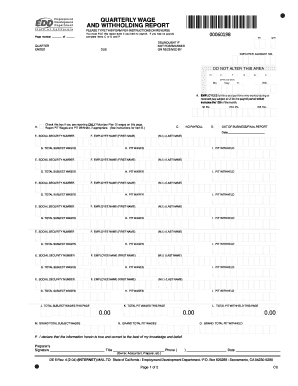
Payroll, complete Items C or D and P. QUARTER ENDED YR QTR DELINQUENT IF NOT POSTMARKED OR RECEIVED BY DUE EMPLOYER ACCOUNT NO. DO NOT ALTER THIS AREA P1 C T S W A EFFECTIVE DATE Mo. Day Yr. WIC A. EMPLOYEES full-time and part-time who worked during or received pay subject to UI for the payroll period which includes the 12th of the month. 1st Mo. B. Check this box if you are reporting ONLY Voluntary Plan DI wages on this page. Report PIT Wages and PIT Withheld, if appropriate.

How it works

  1. Open form

    Open form follow the instructions

  2. Easily sign form

    Easily sign the form with your finger

  3. Share form

    Send filled & signed form or save

How to fill out the CA EDD DE 6 online

Completing the CA EDD DE 6 form online can streamline the process of reporting wages and withholdings for your employees. This guide will provide you with detailed, step-by-step instructions to ensure you fill out the form correctly and efficiently.

Follow the steps to successfully complete your CA EDD DE 6 form online.

  1. Click ‘Get Form’ button to access the CA EDD DE 6 form and open it in your preferred editor.
  2. Review the information required for the quarter and year. Ensure you have all necessary data ready before beginning.
  3. Complete the quarter ended section, specifying the year and quarter accurately.
  4. Enter your employer account number in the designated field to link your report to your business.
  5. In section A, indicate the number of employees who worked during or received pay that is subject to unemployment insurance for the payroll period that includes the 12th of the month.
  6. If applicable, check the box in section B to report only voluntary plan disability wages, and provide any necessary information for PIT wages and withholding.
  7. If there was no payroll during the reporting quarter, check the box in section C. Ensure you enter zeroes in relevant fields.
  8. If this is your final report or if your business is out of operation, check the box in section D and provide the closure date.
  9. In sections E and F, enter the social security number and the names of each employee to whom wages were paid.
  10. Proceed to section G, where you'll enter the total subject wages paid to each employee during the quarter, followed by PIT wages in section H and any PIT withheld in section I.
  11. On the last page (or the required page), ensure you compile and enter the grand totals for sections M, N, and O.
  12. Finally, sign in section P, stating your title, phone number, and the date to validate your report.
  13. Once you have completed all sections, save your changes, and you can choose to download, print, or share the completed form as needed.

Complete your CA EDD DE 6 form online today to ensure timely and accurate reporting.

Get form

Experience a faster way to fill out and sign forms on the web. Access the most extensive library of templates available.
Get form

Related content

EDD - CA.gov
EDD offers support for job seekers, claims, employers, and more. Access resources for...
Learn more
Unemployment Benefits - EDD - CA.gov
Apply for unemployment benefits in California, get the support you need during job loss...
Learn more
VEGACAL 67 - Two-wire 4 … 20 mA/HART
Mar 5, 2021 — 6. Lift the opening levers of the terminals with a screwdriver (see...
Learn more

Related links form

Montgomery College I20 Calpers Direct Deposit Form Fillable Nyc Consent To Release Information Nbcot Testing Accommodations

Questions & Answers

Get answers to your most pressing questions about US Legal Forms API.

Contact support

Filing a claim for EDD is done through the California EDD website or by phone. You will need to provide specific information about your employment history and earnings. Remember, timely filing is crucial to ensure you receive benefits without delays linked to claims associated with the CA EDD DE 6.

Completing an EDD form involves providing accurate personal and employment information. Begin by reading the instructions for the specific form thoroughly, whether it’s for unemployment claims or tax withholding. Utilizing resources like uslegalforms can simplify this process, especially for forms related to the CA EDD DE 6.

To fill out an EDD claim, you need to gather relevant information such as your employment history and personal details. First, visit the California EDD website and navigate to the claims section. Follow the prompts carefully to complete the CA EDD DE 6 form accurately, ensuring you provide all required information.

To connect with a live person at EDD California, dial their contact number during business hours. It's essential to have your claim information handy to expedite the conversation. If you have questions about the CA EDD DE 6 or other forms, interacting with a real representative can provide you tailored assistance.

To speak with a live person at EDD Unemployment California, call their customer service line during business hours. Be prepared to provide your personal information such as your Social Security number and details about your claim. This can be especially useful if you have questions regarding your CA EDD DE 6 form or other employment issues.

Yes, you can visit the EDD office in person to get assistance with your California unemployment claims, including inquiries about the CA EDD DE 6 form. However, it's a good idea to check the office hours and whether you need an appointment. Many individuals prefer to handle their claims online, but in-person help is available if you need it.

Start by entering your personal details at the top of the W-4 form. Next, follow the instructions to determine the number of allowances you should claim based on your situation. Utilizing resources that explain the CA EDD DE 6 can help clarify any confusion as you complete your W-4 form.

The number of allowances you should claim on your DE4 form depends on your personal financial situation. Generally, claim 1 allowance for yourself and additional allowances for dependents. However, it's wise to consult the CA EDD DE 6 guidelines or a tax professional to determine the best number for your specific circumstances.

To file for EDD, start by visiting the California Employment Development Department website. You must create an account and complete your application online. After submitting your information, keep an eye on your email for confirmation and further instructions related to your CA EDD DE 6 filing.

To fill out the California DE 4, you need to provide personal information, including your Social Security number and filing status. This form helps determine the correct amount of state income tax to withhold from your paycheck. Ensure you provide accurate information to avoid any tax issues later. If you need further clarification or resources, US Legal Forms can guide you through the process effectively.

Get This Form Now!

Use professional pre-built templates to fill in and sign documents online faster. Get access to thousands of forms.
Get form
If you believe that this page should be taken down, please follow our DMCA take down processhere.

Industry-leading security and compliance

US Legal Forms protects your data by complying with industry-specific security standards.
  • In businnes since 1997
    25+ years providing professional legal documents.
  • Accredited business
    Guarantees that a business meets BBB accreditation standards in the US and Canada.
  • Secured by Braintree
    Validated Level 1 PCI DSS compliant payment gateway that accepts most major credit and debit card brands from across the globe.
Get CA EDD DE 6
Get form
  • Adoption
  • Bankruptcy
  • Contractors
  • Divorce
  • Home Sales
  • Employment
  • Identity Theft
  • Incorporation
  • Landlord Tenant
  • Living Trust
  • Name Change
  • Personal Planning
  • Small Business
  • Wills & Estates
  • Packages A-Z
  • Affidavits
  • Bankruptcy
  • Bill of Sale
  • Corporate - LLC
  • Divorce
  • Employment
  • Identity Theft
  • Internet Technology
  • Landlord Tenant
  • Living Wills
  • Name Change
  • Power of Attorney
  • Real Estate
  • Small Estates
  • Wills
  • All Forms
  • Forms A-Z
  • Form Library
  • Legal Hub
  • About Us
  • Help Portal
  • Legal Resources
  • Blog
  • Affiliates
  • Contact Us
  • Delete My Account
  • Site Map
  • Industries
  • Forms in Spanish
  • Localized Forms
  • State-specific Forms
  • Forms Kit
  • Real Estate Handbook
  • All Guides
  • Notarize
  • Incorporation services
  • For Consumers
  • For Small Business
  • For Attorneys
  • USLegal
  • FormsPass
  • pdfFiller
  • signNow
  • altaFlow
  • DocHub
  • Instapage
Form Packages
  • Adoption
  • Bankruptcy
  • Contractors
  • Divorce
  • Home Sales
  • Employment
  • Identity Theft
  • Incorporation
  • Landlord Tenant
  • Living Trust
  • Name Change
  • Personal Planning
  • Small Business
  • Wills & Estates
  • Packages A-Z
Form Categories
  • Affidavits
  • Bankruptcy
  • Bill of Sale
  • Corporate - LLC
  • Divorce
  • Employment
  • Identity Theft
  • Internet Technology
  • Landlord Tenant
  • Living Wills
  • Name Change
  • Power of Attorney
  • Real Estate
  • Small Estates
  • Wills
  • All Forms
  • Forms A-Z
  • Form Library
Customer Service
  • Legal Hub
  • About Us
  • Help Portal
  • Legal Resources
  • Blog
  • Affiliates
  • Contact Us
  • Delete My Account
  • Site Map
  • Industries
  • Forms in Spanish
  • Localized Forms
  • State-specific Forms
  • Forms Kit
Legal Guides
  • Real Estate Handbook
  • All Guides
Prepared for you
  • Notarize
  • Incorporation services
Our Customers
  • For Consumers
  • For Small Business
  • For Attorneys
Our Sites
  • USLegal
  • FormsPass
  • pdfFiller
  • signNow
  • altaFlow
  • DocHub
  • Instapage
Social Media
Call us now toll free:
+1 833 426 79 33
As seen in:
© Copyright 1999-2026 airSlate Legal Forms, Inc. 3720 Flowood Dr, Flowood, Mississippi 39232
  • Your Privacy Choices
  • Terms of Service
  • Privacy Notice
  • Content Takedown Policy
  • Bug Bounty Program