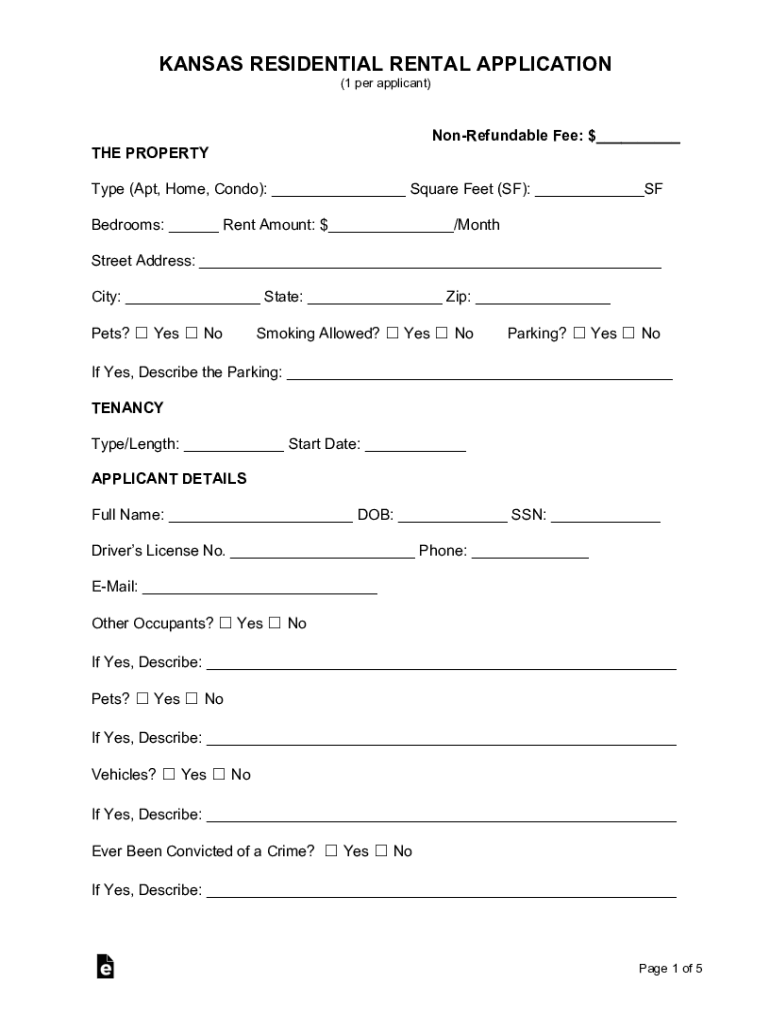
KANSAS RESIDENTIAL RENTAL APPLICATION (1 per applicant)NonRefundable Fee: $ THE PROPERTY Type (Apt, Home, Condo): Square Feet (SF): SF Bedrooms: Rent Amount: $ /Month Street Address: City: State:.
Loading

Open form follow the instructions

Easily sign the form with your finger

Send filled & signed form or save
How to fill out the KS Residential Rental Application online
Filling out a rental application can be a straightforward process if you know what to expect. This guide provides step-by-step instructions on how to complete the KS Residential Rental Application online, ensuring that you provide all necessary information accurately.
Follow the steps to complete your application smoothly.
- Click the ‘Get Form’ button to access the KS Residential Rental Application and open it for editing.
- Begin by filling out the property details. Indicate the type of property (apartment, home, condo), square footage, number of bedrooms, and the monthly rent amount. Provide the complete street address, city, state, and zip code. Specify if pets are allowed and if smoking is permitted.
- Next, move to the tenancy section. Fill in the type and length of tenancy you are applying for, along with the anticipated start date.
- In the applicant details section, enter your full name, date of birth, social security number, driver’s license number, phone number, and email address. If there are other occupants or pets, provide their details as well.
- Complete your current employment information by including the company name, occupation, duration of employment, and your gross income. Provide the address of your workplace and the supervisor's name.
- Fill out the previous employment details similarly to your current employment, if applicable.
- Provide your current and previous residence information, including type, square footage, number of bedrooms, rent amount, and addresses. Include lease information and any relevant landlord contact details.
- List your personal references, including their names, relationships to you, email addresses, and phone numbers.
- Enter your financial information, including bank account details and credit card information, specifying the type of account and card.
- Review and complete the consent and acknowledgment section, ensuring that you certify the accuracy of the provided information. Include your signature and the date.
- Finally, save your changes. You may choose to download, print, or share the completed application as necessary.
Start filling out your KS Residential Rental Application online today for a streamlined rental process.
Experience a faster way to fill out and sign forms on the web. Access the most extensive library of templates available.
Related content
Rental payment for the first month shall be prorated if the above described property is...
FORWARD. This handbook is intended to provide information and advice to students about...
25 Jan 2021 — Resolution 2021-02: Approve 2021 Application for HOME Tenant Based. Rent...
Get answers to your most pressing questions about US Legal Forms API.
What makes you stand out on a rental application?
References – provide a minimum of 3 references that can vouch for your tenancy record and character. Bank statements – provide current bank records with a sufficient balance that will show you're fully capable of meeting the rental payment requirement for a few months.
What is considered normal wear and tear in Kansas?
Damage in Kansas. “Normal Wear and Tear” refers to the deterioration that occurs as a result of use for which the rental unit is intended and without negligence, carelessness, accident, or misuse or abuse of the premises or contents by the tenant or members of his household, or their invitees or guests.
Is Kansas a renter friendly state?
Kansas is a moderately landlord-friendly state. There are no rent control laws, and tenants are unable to withhold rent unless it is for repairs.
Do landlords have to provide air conditioning in Kansas?
(On these last two, the landlord does not necessarily have to pay for the utility services, but he or she must provide the equipment and it must work.) Maintain all electrical, plumbing, sanitary, heating, ventilation, and air conditioning systems in good and safe working order.
What Cannot Be Asked on Rental Applications in Kansas?
The Rental Licensing and Inspection program began in 1996 requiring all landlords of residential rental property to maintain a valid rental license in compliance with City Ordinance 66057 (Sec 19-25 through 249 of Code of Ordinances).
Use professional pre-built templates to fill in and sign documents online faster. Get access to thousands of forms.
If you believe that this page should be taken down, please follow our DMCA take down process here.