Loading
Get Pdf Pdf Transcript Request Form - Concordia University
How it works
-

Open form follow the instructions
-

Easily sign the form with your finger
-

Send filled & signed form or save
How to fill out the PDF PDF Transcript Request Form - Concordia University online
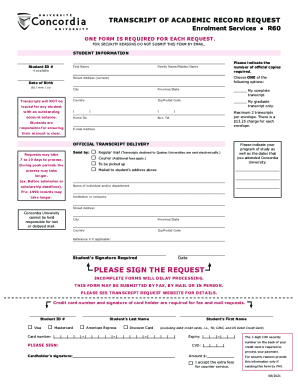
This guide will provide you with detailed instructions on how to effectively complete the PDF PDF Transcript Request Form for Concordia University. Whether you are requesting a complete transcript or a specific subset, this comprehensive guide will ensure that you fill out the form accurately and efficiently.
Follow the steps to successfully fill out your transcript request form.
- Click ‘Get Form’ button to obtain the PDF PDF Transcript Request Form and open it in your preferred PDF editor.
- Enter your student ID number in the designated field. This is essential for processing your request.
- Fill in your first name and family name/maiden name if available. Accurate naming is important for identification.
- Indicate the number of official copies you require using the specified field.
- Select your preferred option for the type of transcript you need: either your complete transcript or just your graduate transcript.
- Enter your current street address, city, province/state, country, and zip/postal code accurately to ensure correct delivery.
- Provide your date of birth in the format of dd/mm/yy. This helps in verifying your identity.
- Fill out your home and business telephone numbers along with your email address. This information could be important for contact purposes.
- Choose your preferred delivery method for your transcripts, such as regular mail, courier (with additional fees), or to be picked up.
- Provide details about your program of study and the dates you attended Concordia University, as this information is necessary for transcript issuance.
- If applicable, enter the name of the individual or department at the receiving institution or company where the transcripts should be sent.
- Sign the request with your name and include the date. Please ensure that the form is complete as incomplete submissions will delay processing.
- If you are submitting by fax or mail, provide your credit card information, including the cardholder's signature, to cover potential fees.
- Review all information for accuracy, then save changes, download, print, or share the completed form as required.
Complete your transcript request online today for efficient processing and delivery.
On the Student Center page, select “Transcript and Verification”, then click on “Request Official Transcript”. Select the CUNY Institution from which you are requesting a transcript and have attended/enrolled. Enter in your email address and then click “Continue”. Confirm your personal information is correct.