We use cookies to improve security, personalize the user experience, enhance our marketing activities (including cooperating with our marketing partners) and for other business use.
Click "here" to read our Cookie Policy. By clicking "Accept" you agree to the use of cookies. Read less
Read more
Accept
Loading
Form preview
  • US Legal Forms
  • Form Library
  • More Forms
  • More Multi-State Forms
  • If You Want To Combine Super From Multiple Accounts, You'll Need To Complete A Separate Form With

Get If You Want To Combine Super From Multiple Accounts, You'll Need To Complete A Separate Form With

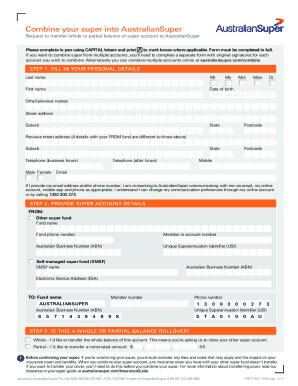
Combine your super into AustralianSuperRequest to transfer whole or partial balance of super account to AustralianSuper Please complete in pen using CAPITAL letters and print 7 to mark boxes where.

How it works

  1. Open form

    Open form follow the instructions

  2. Easily sign form

    Easily sign the form with your finger

  3. Share form

    Send filled & signed form or save

How to fill out the If You Want To Combine Super From Multiple Accounts, You'll Need To Complete A Separate Form With online

Combining superannuation accounts can help simplify your finances and manage your retirement savings more effectively. This guide will walk you through the process of filling out the form required to combine your super from multiple accounts online, ensuring clarity and ease of understanding.

Follow the steps to complete your form accurately.

  1. Press the ‘Get Form’ button to acquire the form and open it in an editor where you can input your information.
  2. Fill in your personal details in the designated fields. Include your last name, first name, date of birth, street address, and contact numbers. Make sure to print in CAPITAL letters and mark boxes clearly as directed.
  3. Provide the details of the super account you wish to transfer from. This includes the fund name, phone number, member or account number, Australian Business Number (ABN), and Unique Superannuation Identifier (USI), if applicable.
  4. Indicate whether you are requesting a whole or partial balance rollover. Select the appropriate option and if it's a partial transfer, specify the amount you want to transfer.
  5. Enter your Tax File Number (TFN) if you choose to do so. This is optional but may streamline the processing of your super rollover.
  6. Sign the form at the designated area and date it. Your signature confirms that you have understood the statements regarding fees and liabilities associated with the transfer.
  7. Once everything is filled out correctly, save your changes. You can then download, print, or share the completed form as needed.

Complete your documents online to ensure a smooth combining of your super accounts.

Get form

Experience a faster way to fill out and sign forms on the web. Access the most extensive library of templates available.
Get form

Related content

Instructions for Form 720 (06/2021) | Internal...
If you file the second quarter Form 720 only to report the PCOR fee, no filing is required...
Learn more
REDCap FAQ (PDF - UT Southwestern
can select a project, select a form and do data entry or review data that was ... If you...
Learn more
The Ultimate Guide to Google Sheets - Revere Local...
Chapter 2: Google Forms Guide—Everything You Need to Make Great Forms for Free ....
Learn more

Related links form

The Calendar Feature In Outlook Can Be Used To Add Appointments To Your Own Or Another Film &amp Adoption Assistance Program Expense Reimbursement Application WRITING FOR MANAGERS Course Applies Management Skills ...

Questions & Answers

Get answers to your most pressing questions about US Legal Forms API.

Contact support

Having multiple super accounts could mean you are paying unnecessary fees and charges. This can reduce your overall retirement income. You can find and manage your super using ATO online services through myGov . Here you can see all your fund details, including any accounts you may have forgotten about.

Consolidating your super Some of the reasons you might want to move multiple super accounts into one include: paying only one set of fees: you pay administration and other fees on each super account you have. less paperwork: one fund means only one lot of paperwork (such as annual statements, funds reports)

You can do this easily online through the ATO: go to my.gov.au. log in or create an account. link your myGov account to the ATO. select 'Super' and then 'Manage' select 'Transfer super' (this option will only appear if you have more than one super account)

There may be reasons for having more than one super account, but in general multiple super accounts could mean multiple fees, more paperwork and more of a chance of losing track of your money.

You can only transfer a full super account balance from one super fund to another using our online services. Partial transfers can't be done online. If you wish to transfer a part of your super account balance from one super fund to another, contact the super fund you wish to transfer money from.

How to consolidate your super go to my.gov.au. log in or create an account. link your myGov account to the ATO. select 'Super' and then 'Manage' select 'Transfer super' (this option will only appear if you have more than one super account)

Reasons for keeping more than one fund include: you may lose insurance benefits you won't get from another fund. sometimes it isn't possible for you to transfer your money out of an account (for instance, if you are in a defined benefit fund) you may actually want more than one super fund.

If you have a MyGov account, you can select the super tab and then manage and then transfer. This option takes you through the process of transferring your super balances between your accounts, so that you can consolidate your super into one account.

Get This Form Now!

Use professional pre-built templates to fill in and sign documents online faster. Get access to thousands of forms.
Get form
If you believe that this page should be taken down, please follow our DMCA take down processhere.

Industry-leading security and compliance

US Legal Forms protects your data by complying with industry-specific security standards.
  • In businnes since 1997
    25+ years providing professional legal documents.
  • Accredited business
    Guarantees that a business meets BBB accreditation standards in the US and Canada.
  • Secured by Braintree
    Validated Level 1 PCI DSS compliant payment gateway that accepts most major credit and debit card brands from across the globe.
Get If You Want To Combine Super From Multiple Accounts, You'll Need To Complete A Separate Form With
Get form
Form Packages
Adoption
Bankruptcy
Contractors
Divorce
Home Sales
Employment
Identity Theft
Incorporation
Landlord Tenant
Living Trust
Name Change
Personal Planning
Small Business
Wills & Estates
Packages A-Z
Form Categories
Affidavits
Bankruptcy
Bill of Sale
Corporate - LLC
Divorce
Employment
Identity Theft
Internet Technology
Landlord Tenant
Living Wills
Name Change
Power of Attorney
Real Estate
Small Estates
Wills
All Forms
Forms A-Z
Form Library
Customer Service
Terms of Service
Privacy Notice
Legal Hub
Content Takedown Policy
Bug Bounty Program
About Us
Blog
Affiliates
Contact Us
Delete My Account
Site Map
Industries
Forms in Spanish
Localized Forms
State-specific Forms
Forms Kit
Legal Guides
Real Estate Handbook
All Guides
Prepared for You
Notarize
Incorporation services
Our Customers
For Consumers
For Small Business
For Attorneys
Our Sites
US Legal Forms
USLegal
FormsPass
pdfFiller
signNow
airSlate WorkFlow
DocHub
Instapage
Social Media
Call us now toll free:
+1 833 426 79 33
As seen in:
  • USA Today logo picture
  • CBC News logo picture
  • LA Times logo picture
  • The Washington Post logo picture
  • AP logo picture
  • Forbes logo picture
© Copyright 1997-2025
airSlate Legal Forms, Inc.
3720 Flowood Dr, Flowood, Mississippi 39232
Form Packages
Adoption
Bankruptcy
Contractors
Divorce
Home Sales
Employment
Identity Theft
Incorporation
Landlord Tenant
Living Trust
Name Change
Personal Planning
Small Business
Wills & Estates
Packages A-Z
Form Categories
Affidavits
Bankruptcy
Bill of Sale
Corporate - LLC
Divorce
Employment
Identity Theft
Internet Technology
Landlord Tenant
Living Wills
Name Change
Power of Attorney
Real Estate
Small Estates
Wills
All Forms
Forms A-Z
Form Library
Customer Service
Terms of Service
Privacy Notice
Legal Hub
Content Takedown Policy
Bug Bounty Program
About Us
Blog
Affiliates
Contact Us
Delete My Account
Site Map
Industries
Forms in Spanish
Localized Forms
State-specific Forms
Forms Kit
Legal Guides
Real Estate Handbook
All Guides
Prepared for You
Notarize
Incorporation services
Our Customers
For Consumers
For Small Business
For Attorneys
Our Sites
US Legal Forms
USLegal
FormsPass
pdfFiller
signNow
airSlate WorkFlow
DocHub
Instapage
Social Media
Call us now toll free:
+1 833 426 79 33
As seen in:
  • USA Today logo picture
  • CBC News logo picture
  • LA Times logo picture
  • The Washington Post logo picture
  • AP logo picture
  • Forbes logo picture
© Copyright 1997-2025
airSlate Legal Forms, Inc.
3720 Flowood Dr, Flowood, Mississippi 39232