Loading
Get Onlinesbi
How it works
-

Open form follow the instructions
-

Easily sign the form with your finger
-

Send filled & signed form or save
How to fill out the Onlinesbi online
Filling out the Onlinesbi registration form is an essential step in gaining access to State Bank of India's internet banking services. This guide provides clear, step-by-step instructions to help you successfully complete the registration process.
Follow the steps to complete your Onlinesbi registration form
- Click the ‘Get Form’ button to access the Onlinesbi registration form and open it in the editor.
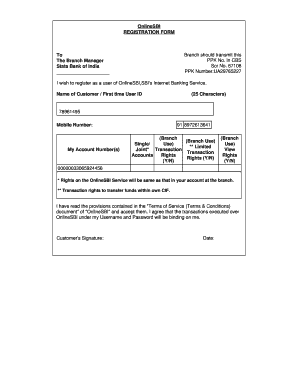
- Begin by entering your name as the customer or your first-time user ID in the designated field, ensuring it does not exceed 25 characters.
- Provide your mobile number in the mobile number field to ensure you receive important notifications and updates.
- In the account number section, list your account number(s) where you wish to have online transaction rights. Include details relevant to each account such as branch.
- Review the terms of service linked in the registration form. After reading, confirm your acceptance of these terms by checking the provided acknowledgment box.
- Sign the document in the space allocated for the customer’s signature to validate your application.
- Finally, input the date of signing the form to complete the registration process. Save your changes, and opt to download, print, or share the completed form as necessary.
Begin the registration process for Onlinesbi online to access your banking services today.