Loading
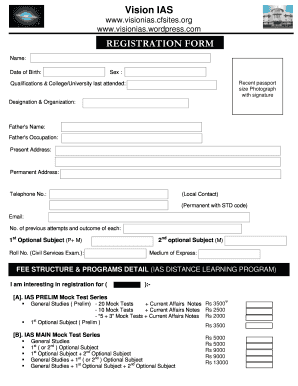
Get Registration-form-vision-ias-program A
How it works
-

Open form follow the instructions
-

Easily sign the form with your finger
-

Send filled & signed form or save
How to fill out the Registration-form-vision-ias-program A online
This guide provides a detailed walkthrough for completing the Registration-form-vision-ias-program A online. Follow the steps carefully to ensure that you fill out the form accurately and completely.
Follow the steps to fill out the registration form effectively.
- Click the ‘Get Form’ button to obtain the registration form and open it in the editor.
- Enter your full name in the designated field at the beginning of the form, ensuring correct spelling and formatting.
- Input your date of birth in the specified format, typically DD/MM/YYYY.
- Select your sex by choosing the appropriate option provided in the form.
- Attach a recent passport-sized photograph with your signature in the area designated for the photo upload.
- Fill out your qualifications and the name of the last college or university attended in the relevant sections.
- Provide your current designation and the organization you are affiliated with.
- Complete the fields for your father's name and occupation.
- Enter your present address and permanent address where applicable.
- Include your local contact number and the permanent number with the appropriate area code.
- Input your email address in the field provided, ensuring it is an active address.
- Indicate the number of previous attempts at the Civil Services Exam and the outcomes of each attempt.
- Choose your first optional subject for the examination and input your roll number if applicable.
- Select your second optional subject and specify your medium of expression for the examination.
- Review the fee structure and indicate your interest in registration for one or more programs by marking the appropriate options.
- Fill out any additional details required regarding payment methods, including information for bank transfers or demand draft.
- Finalize your form by reviewing all entries for accuracy, then save your changes.
- Download, print, or share the form as needed, following the submission guidelines provided.
Complete your registration form online now to secure your place in the program.
Vision IAS Test Series Fees Structure Test NameFeesNo. of TestGS Main-Test Series (English)Rs. 2900030 TestGS Pre-Test Series (English)Rs. 900025 TestAptitude Test Series (English)Rs. 700020 testPHILOSOPHY TEST SERIESRs. 110008 Test5 more rows • Aug 8, 2023
Industry-leading security and compliance
US Legal Forms protects your data by complying with industry-specific security standards.
-
In businnes since 199725+ years providing professional legal documents.
-
Accredited businessGuarantees that a business meets BBB accreditation standards in the US and Canada.
-
Secured by BraintreeValidated Level 1 PCI DSS compliant payment gateway that accepts most major credit and debit card brands from across the globe.