Unded child abuse or school employee report which occurred over five years ago. p Applicant is named as the perpetrator of an indicated child abuse or school employee report. p Applicant is not named as the perpetrator of any child abuse or school employee report contained in the Statewide Central Register. PENNSYLVANIA STATE POLICE CLEARANCE p Record exists and contains convictions which prohibit hire in a child care position. Report attached. p Record exists, but convictions do not prohibit.

Open form follow the instructions

Easily sign the form with your finger

Send filled & signed form or save
How to fill out the Child Abuse Clearance online
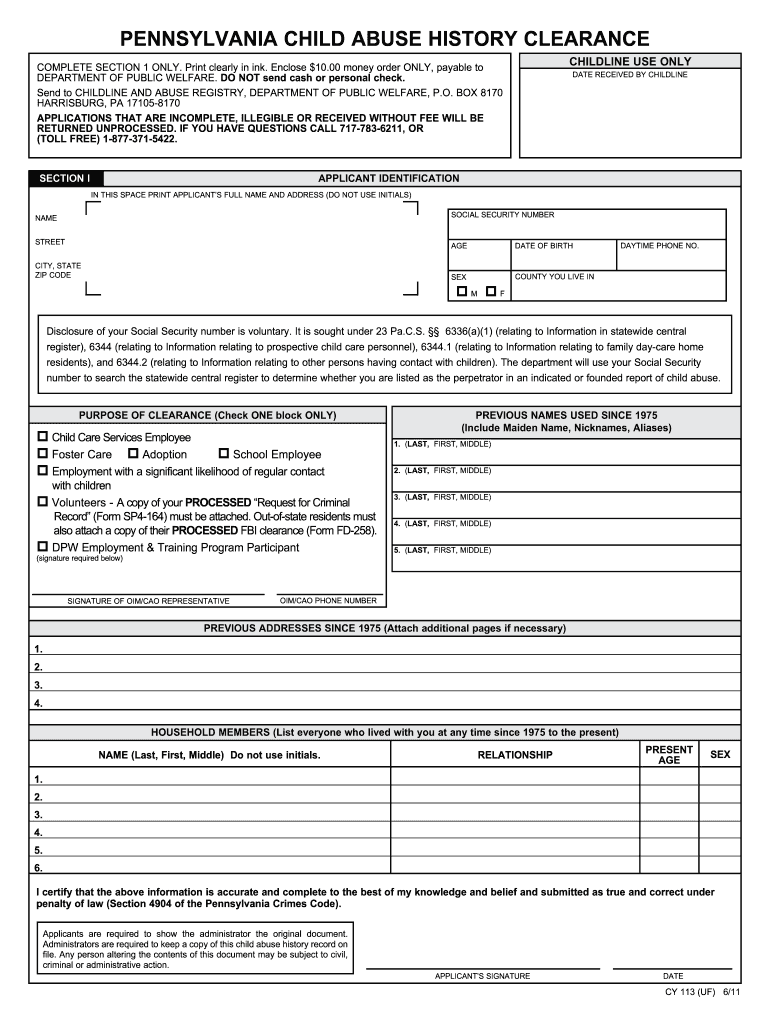
This guide provides clear, step-by-step instructions for completing the Child Abuse Clearance form online. Whether you are new to this process or seeking a refresher, these directions aim to support you in submitting an accurate application.
Follow the steps to successfully fill out the form.
- Click ‘Get Form’ button to access the Child Abuse Clearance application.
- In Section I, fill out your full legal name and current address, ensuring no initials are used. This information is necessary as it will be the address where your clearance results are mailed.
- Provide your Social Security number in the space provided, keeping in mind that this is voluntary. If you choose to include it, ensure it is the complete number.
- Enter your current age and date of birth in the specified formats. Make sure these details are accurate.
- Fill in your daytime phone number so that you can be contacted if there are questions regarding your application.
- Indicate your sex by checking the appropriate box.
- Specify the county where you reside, ensuring it matches your listed address.
- Select the purpose of your clearance by checking one box only that best describes your reason for applying. Ensure that you adhere to the outlined conditions for each option.
- List any previous names you have used since 1975 and all addresses where you have resided since then. Additional pages can be attached if necessary.
- Identify all household members who have lived with you since 1975, providing their names, relationships, ages, and sexes as required.
- Sign and date your application at the end. Note that applications lacking a signature will be returned.
- Enclose a $10.00 money order made out to the Department of Public Welfare with your application. Ensure that no cash or personal checks are included.
- Submit your completed application to the specified address and allow up to 14 days for processing to receive your clearance results.
Complete your application online today to ensure timely processing of your Child Abuse Clearance.
Experience a faster way to fill out and sign forms on the web. Access the most extensive library of templates available.
Related content
For questions related to the Pennsylvania Child Abuse History Clearance, please contact...
Mailing in paper application (the Pennsylvania Child Abuse History Clearance – also...
Required by the PA Child Protective Service Law ... the safety of children by requiring...
Get answers to your most pressing questions about US Legal Forms API.
How long are PA clearances valid?
The PA Criminal History clearance is valid for one year from issuance date. You can obtain the PA Criminal History Clearance electronically at https://epatch.state.pa.us/ by clicking on the Submit a New Record Check link.
What are the 3 PA clearances?
Clearances/Background Checks The following three background checks are required: Department of Human Services Child Abuse History Clearance. Pennsylvania State Police Request for Criminal Records Check. Federal Criminal History Record Information (CHRI)
How long do child clearances last in PA?
All required clearances, including FBI, must be renewed every three years (36 months). Volunteers who have been a resident of Pennsylvania for fewer than 10 years must renew their FBI Fingerprint clearance until they reach 10 years of residency in Pennsylvania.
How do I get a copy of my PA child clearance?
Otherwise, to obtain a copy of your clearance certificate you may log in to your Child Welfare Account and go to the "PA Child Abuse History Clearance Account" screen. Here you may view submitted and / or processed applications.
How long are child clearances good for in PA for Volunteers?
What is the renewal requirement for clearances? All volunteers will be required to obtain clearances every 60 months. Time frames for renewed clearances are based upon the date of each individual clearance.
How much do PA child clearances cost?
The Child Abuse History Clearance is payable by a $13 credit card payment. You are responsible for the cost. This clearance will be credentialing that you will make a part of your personal employment credentials.
How do I get my PA Act 33 clearance?
Act 33 - Child Abuse History Clearance In order to complete the online electronic application, you must first create a Keystone Key account and then submit an application. Go to https://.compass.state.pa.us/cwis/public/home. Click "Create Individual Account."
How often do you need child clearances in PA?
The Child Abuse clearance costs $13. The FBI federal criminal history clearance costs $23.85 through the Department of Human Services. How often do I need to renew my clearances? Clearances must be obtained every 60 months.
Use professional pre-built templates to fill in and sign documents online faster. Get access to thousands of forms.
If you believe that this page should be taken down, please follow our DMCA take down process here.