Loading
Get Request For Internal Review Application - Pdf - Ministry Of ...
How it works
-

Open form follow the instructions
-

Easily sign the form with your finger
-

Send filled & signed form or save
How to fill out the Request For Internal Review Application - PDF - Ministry Of Community and Social Services online
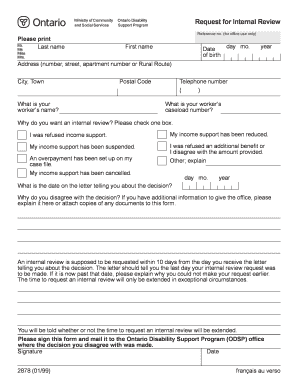
This guide will help you understand how to fill out the Request For Internal Review Application form for the Ontario Disability Support Program. By following these steps, you will ensure that your request is complete and properly submitted.
Follow the steps to successfully complete your application
- Click the ‘Get Form’ button to obtain the application form and open it in your document editor.
- Begin by entering your reference number in the designated field. This information is for office use and helps track your application.
- Provide your personal details by filling in your last name, first name, and preferred title (Mr., Ms., Miss, or Mrs.).
- Input your date of birth using the day, month, and year fields to confirm your identity.
- Enter your home address, including the street number, apartment number if applicable, city or town, and postal code.
- Fill in your telephone number to ensure the office can contact you if needed.
- Indicate the name of your worker and their caseload number to provide context for your application.
- Specify the reason for requesting an internal review by checking the appropriate box. Options include refusal of income support, reduction or suspension of support, and any other specific issue.
- Document the date mentioned in the decision letter you received, as this is important for tracking the timeline of your request.
- Write a brief explanation of why you disagree with the decision, including any additional information or documents that you would like to provide.
- Be mindful of the 10-day submission timeframe after receiving the decision letter. If your request is late, explain why it was not submitted earlier.
- Sign and date the form to confirm the accuracy of the information provided before submitting it.
- Finally, save any changes made to the document, and choose to download, print, or share the completed form to send it to the relevant Ontario Disability Support Program office.
Complete your Request for Internal Review Application online today!
An internal review is an internal investigation that the agency conducts into a complaint. The agency will assess whether or not it has complied with its privacy obligations, and then tell the applicant of its findings and what it will do as a result.