Loading
Get Kitsong Application - Kitsong Co
How it works
-

Open form follow the instructions
-

Easily sign the form with your finger
-

Send filled & signed form or save
How to fill out the Kitsong Application - Kitsong Co online
Filling out the Kitsong Application is a crucial step in the enrollment process for prospective learners at Kitsong Co. This guide provides clear, step-by-step instructions to help you complete the application accurately and efficiently.
Follow the steps to successfully complete the Kitsong Application.
- Press the ‘Get Form’ button to access the application and open it in your preferred editing tool.
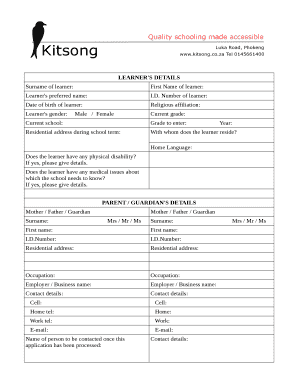
- Begin by entering the learner's details in the designated fields, including surname, first name, preferred name, ID number, date of birth, and religious affiliation. Ensure all names are spelled correctly.
- Indicate the learner's gender by selecting either 'Male' or 'Female' as appropriate. Specify the current grade and current school the learner is attending.
- Provide details regarding the grade the learner intends to enter, along with the academic year. Complete the residential address during the school term.
- Indicate with whom the learner resides and the home language spoken at home. Answer the questions regarding any physical disabilities or medical issues by providing necessary details if applicable.
- Proceed to the parent or guardian's details section. Input the surname, first name, ID number, residential address, occupation, employer or business name, and contact details for the mother, father, or guardian.
- Fill out the scholastic information by detailing any special achievements in academic, sports, and cultural areas. Indicate if the learner has ever been expelled or repeated a school year, providing additional information as prompted.
- Enter the name of the person responsible for paying school fees along with their contact details. Include cell number, home telephone, work telephone, and email.
- Review and confirm that all information provided is accurate. Complete the declaration section by signing and dating where indicated for both the learner and the parent or guardian.
- Finally, collect the required documents to accompany the application, including a copy of the child's birth certificate, a copy of the parent or guardian's ID, a copy of the ID of the person responsible for paying fees, and the learner's most recent school report. Once all steps are complete, save changes, download, or print the application as needed.
Take the next step and complete your application online today.
Olga Motshwanedi-Marimo - School Principal - kitsong | LinkedIn.