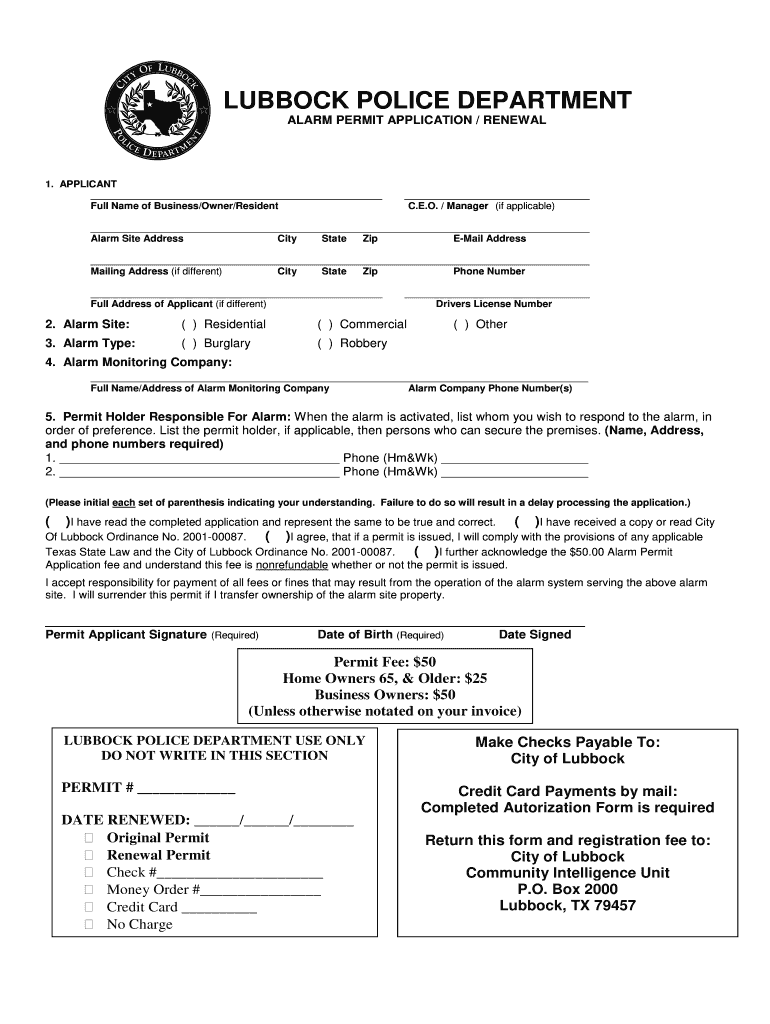
__ C.E.O. / Manager (if applicable) _________________________________________________________________________________________ Alarm Site Address City State Zip E-Mail Address _________________________________________________________________________________________ Mailing Address (if different) City State Zip Phone Number ____________________________________________________ Full Address of Applicant (if different) _________________________________ Drivers License Number 2. Alarm Site: ( ) Re.

Open form follow the instructions

Easily sign the form with your finger

Send filled & signed form or save
How to fill out the TX Alarm Permit Application/Renewal - Lubbock City online
Filling out the TX Alarm Permit Application/Renewal for Lubbock City online is a straightforward process that helps ensure the safety and management of alarm systems. This guide provides step-by-step instructions to assist you in completing the application effectively.
Follow the steps to complete your alarm permit application online.
- Press the ‘Get Form’ button to access the application form and open it in your document editor.
- Begin by entering the full name of the business, owner, or resident in the designated field. If applicable, provide the name of the C.E.O. or manager.
- Fill out the alarm site address, including the city, state, and zip code. Ensure that the email address and mailing address (if different) are correctly entered, along with the phone number.
- If the full address of the applicant is different from the alarm site, provide that information next.
- Indicate whether the alarm site is residential or commercial by checking the appropriate box.
- Select the type of alarm you have by marking one of the options: burglary, robbery, or other.
- Enter the full name and address of the alarm monitoring company, along with their phone number(s).
- List the permit holder responsible for the alarm in order of preference, including name, address, and phone numbers. Ensure that each individual listed is capable of responding to the alarm.
- Initial each statement in the acknowledgment section to confirm your understanding and compliance with the application requirements.
- Sign the application where indicated and provide your date of birth and the date you signed the application.
- Review the permit fees applicable and prepare for payment. Ensure that the payment method is indicated clearly in your documentation.
- Once all fields are completed and reviewed, save your changes, and choose to download, print, or share the completed form as required.
Complete your TX Alarm Permit Application/Renewal online today to ensure your alarm system is registered.
Experience a faster way to fill out and sign forms on the web. Access the most extensive library of templates available.
Related content
Feb 11, 2025 — Late renewal fee ($500 per month). If application is for a renewal...
To provide for the safe and efficient movement of people and goods, the Texas Department...
Indicate by check mark whether the registrant (1) has filed all reports required to be...
Get answers to your most pressing questions about US Legal Forms API.
Do you need a permit for an alarm system in Texas?
Yes, in many cities in Texas, including Lubbock, you need a permit for an alarm system. This requirement helps reduce false alarms and ensures better communication between law enforcement and alarm companies. It's important to check local regulations to avoid fines and legal issues. For ease in obtaining your permit, consider using the US Legal Forms platform, which offers resources for your TX Alarm Permit Application/Renewal - Lubbock City.
What is the number for the city of Lubbock customer service?
For customer service inquiries, you can reach the city of Lubbock at 3-1-1. This line serves as a direct channel to city services and information. Whether you have questions regarding permits or services, the customer service team is ready to assist you. Having quick access to customer service can aid in your TX Alarm Permit Application/Renewal - Lubbock City process.
What is the non-emergency number for the city of Lubbock?
The non-emergency number for the city of Lubbock is 3-1-1. This number is available for residents who need assistance or wish to report non-urgent matters. Knowledge of this number can help you connect with the city services you need quickly. If you're completing a TX Alarm Permit Application/Renewal - Lubbock City, using 311 can be beneficial for accessing related services.
What is the non-emergency number for Lubbock, Texas?
In Lubbock, Texas, you can call 3-1-1 to reach the non-emergency services. This number connects you to the city of Lubbock's customer service for reporting issues like noise complaints or city maintenance. Utilizing the non-emergency number is important to ensure that urgent matters are directed to the right channels. When dealing with an alarm permit, understanding local services can make your TX Alarm Permit Application/Renewal - Lubbock City much easier.
Can you install your own house alarm?
Yes, you can install your own house alarm. However, it's vital to understand the installation and regulatory requirements in Lubbock City. Ensuring compliance with the TX Alarm Permit Application/Renewal - Lubbock City is essential to avoid complications down the line.
Do you need a license to install security systems in Texas?
In Texas, a license is required to install certain types of security systems, specifically those that involve monitored services. To avoid penalties, check which licenses apply to your situation. Using the USLegalForms platform can help clarify which licenses you may need related to the TX Alarm Permit Application/Renewal - Lubbock City.
Does Texas require an alarm permit?
Yes, Texas generally requires an alarm permit for both residential and commercial systems. This requirement helps local law enforcement efficiently manage alarm responses. Applying for the TX Alarm Permit Application/Renewal - Lubbock City can ensure your system is compliant and operational without unnecessary legal hassles.
How do I find out if I need an alarm permit?
To determine if you need an alarm permit, check with your local authorities in Lubbock City. Many municipalities have regulations regarding alarm systems. Consulting the official city website or using resources on the USLegalForms platform can guide you through the requirements related to the TX Alarm Permit Application/Renewal - Lubbock City.
What qualifications do I need for an alarm system?
To qualify for installing an alarm system, you typically need to follow local regulations. This includes ensuring that the system meets safety standards and meets the operational requirements specific to Lubbock City. Additionally, by maintaining compliance, you can streamline the TX Alarm Permit Application/Renewal - Lubbock City process.
Do you need a license to operate security systems in Texas?
In Texas, you do not need a license to install or operate your own security system. However, if you hire a professional installer, they must hold the appropriate license. If you are managing a security system, securing the TX Alarm Permit Application/Renewal in Lubbock City ensures you follow necessary regulations.
Use professional pre-built templates to fill in and sign documents online faster. Get access to thousands of forms.
If you believe that this page should be taken down, please follow our DMCA take down process here.