Loading
Get Application Id # Notice - Santander Consumer Usa
How it works
-

Open form follow the instructions
-

Easily sign the form with your finger
-

Send filled & signed form or save
How to fill out the Application ID # NOTICE - Santander Consumer USA online
This guide provides step-by-step instructions on completing the Application ID # NOTICE from Santander Consumer USA. By following these detailed directions, users can effectively navigate the form and ensure their information is accurately submitted.
Follow the steps to complete your form successfully.
- Click 'Get Form' button to obtain the document and open it in the editor.
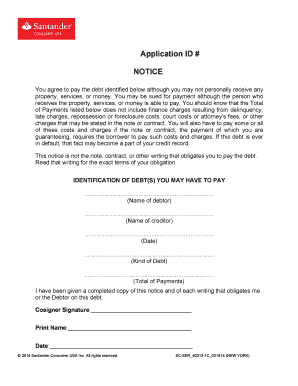
- Identify the sections requiring your attention. First, you will see a section that addresses the agreement to pay the debt. Read this section carefully to understand your obligations and the nature of the debt involved.
- In the 'Identification of Debt(s) You May Have to Pay' section, fill in the necessary details such as the name of the debtor, the name of the creditor, and the date. Make sure that this information is accurate to avoid any discrepancies.
- Next, you will need to state the kind of debt you are responsible for and the total of payments associated with it. Check any corresponding documents to ensure that the amounts are correct.
- Once all necessary fields have been filled, locate the signature area. As a cosigner, sign in the designated space and print your name clearly below.
- Lastly, fill in the date of your signature. After completing all sections accurately, you may choose to save changes, download, print, or share the form as needed.
Complete your documents online today for a smooth submission process.
Find an app ID Click Apps in the sidebar. Click View all apps. Click the. icon in the App ID column to copy the ID of an app.