Loading
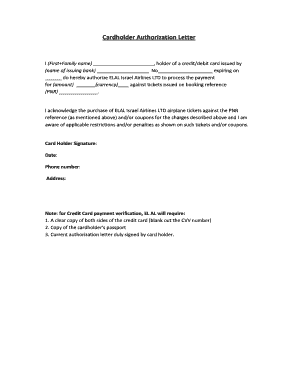
Get Cardholder Authorization Letter - El Al - Elal Co
How it works
-

Open form follow the instructions
-

Easily sign the form with your finger
-

Send filled & signed form or save
How to fill out the Cardholder Authorization Letter - El Al - Elal Co online
Filling out the Cardholder Authorization Letter is a straightforward process that allows users to authorize ELAL Israel Airlines to process payments associated with their bookings. This guide will provide you with detailed and easy-to-follow steps to complete the form online.
Follow the steps to fill out the Cardholder Authorization Letter online.
- Click ‘Get Form’ button to obtain the form and open it in your editing interface.
- In the first field, enter your first and last name as the cardholder. Ensure that the spelling matches what appears on your credit or debit card.
- Next, provide the name of the issuing bank in the designated field. This should reflect the bank that issued your credit or debit card.
- Enter your credit or debit card number in the appropriate section to identify the card being used for the transaction. Make sure this is accurate.
- Fill in the expiration date of the card in the specified format (MM/YY). Ensure that the card is valid at the time of purchase.
- Indicate the amount to be charged and specify the currency. This amount should correspond to the total for the tickets or services you wish to book.
- Provide your booking reference (PNR) in the next field. This reference identifies your reservation with ELAL.
- Read the acknowledgment statement regarding the purchase of tickets related to the PNR. Ensure you understand any restrictions or penalties associated with the tickets.
- Sign the document in the 'Card Holder Signature' section by placing your name or signature as appropriate.
- Date the document to indicate when the authorization is being given.
- Enter your phone number and address in the relevant fields for contact purposes.
- Prepare the additional documents: a clear copy of both sides of your credit card (with the CVV number blanked out), a copy of your passport, and ensure the current authorization letter is signed.
- Once all fields are completed and necessary documents are gathered, save your changes. You can then download or print the completed authorization letter for submission.
Complete your authorization letter and secure your travel plans with ease online.
How Do I Write a Credit Card Authorization Letter? Your full name. Your contact information. The date. Your credit card information and billing address (exclude the CVV code) The amount you are authorizing. The reason for the authorization (be specific!) The business or institution that is authorized to use it.