Loading
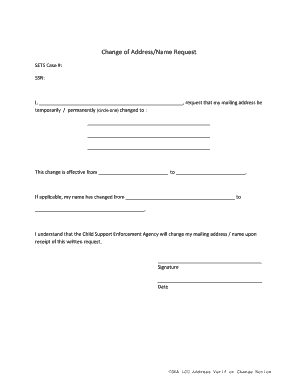
Get Canara Bank Account Transfer Form
How it works
-

Open form follow the instructions
-

Easily sign the form with your finger
-

Send filled & signed form or save
How to fill out the Canara Bank Account Transfer Form online
This guide provides clear and detailed instructions for filling out the Canara Bank Account Transfer Form online. Designed for ease of use, it aims to assist users in accurately completing the necessary fields to ensure a smooth account transfer process.
Follow the steps to successfully complete the form.
- Click ‘Get Form’ button to obtain the form and open it in the editor.
- Begin by filling in your personal information in the designated fields. Ensure that your current name and account number are accurately entered as these details are essential for the transfer process.
- Provide the new address where you want your account statements and correspondence to be sent. Double-check for accuracy to avoid any delivery issues.
- Indicate whether the address change is temporary or permanent by circling the appropriate option. This will help the bank understand your needs regarding correspondence.
- Specify the effective date for the change of address. It is important to select a date that allows for a smooth transition with your communications.
- If your name has changed, fill in the appropriate fields with your previous name and your new name. Ensure that all names are spelled correctly to prevent identification issues.
- Sign the form to validate your request and include the date of signing. This step confirms that you authorize the changes requested.
- Once all fields are completed, review the entire form for any errors. After confirming the accuracy of your information, save the changes, download, print, or share the completed form as needed.
Complete your Canara Bank Account Transfer Form online today to ensure your smooth transition.
Related links form
Step 1: Visit the official website .onlinesbi.com. Step 2: Click on 'Personal Banking,' then enter your username and password. Step 3: A home page will appear on your screen; on the top panel, click the 'e-services' tab. Step 4: Next, from the quick links, select 'Transfer of savings account.