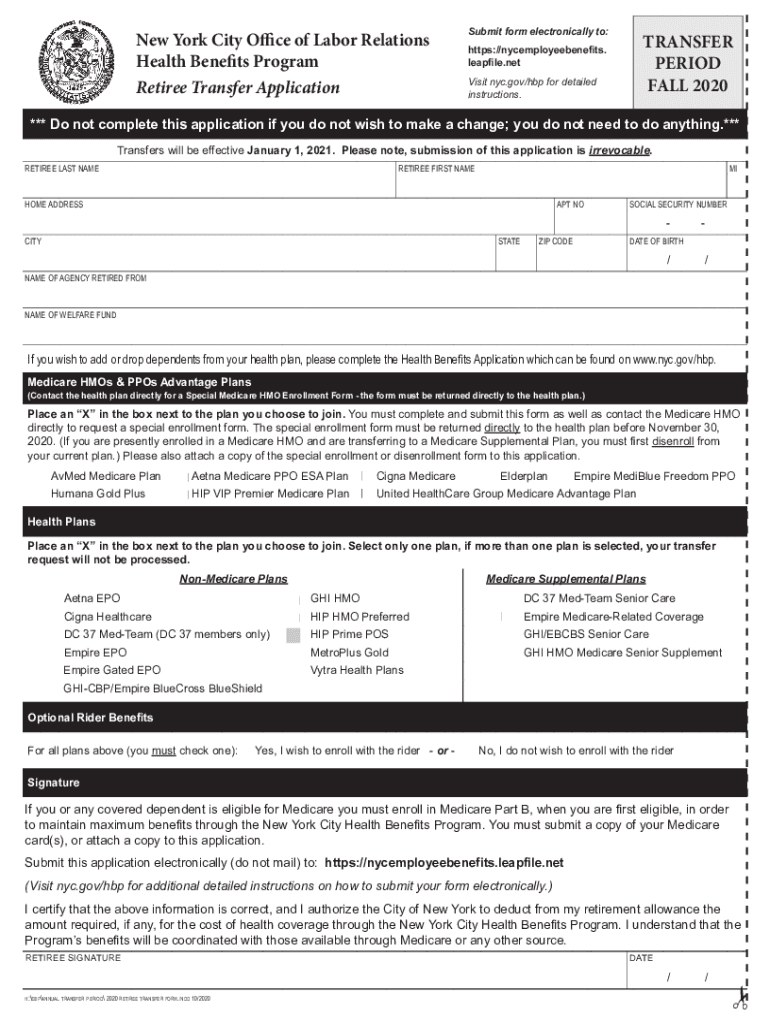
New York City Office of Labor Relations Health Benefits Program nyc.gov/olrFall 2020 Retiree Transfer Period The Fall 2020 Health Benefits Program Retiree Transfer Period begins November 1, 2020 and.
Loading

Open form follow the instructions

Easily sign the form with your finger

Send filled & signed form or save
How to fill out the Nycemployeebenefits Leapfile Net online
This guide provides clear, step-by-step instructions for filling out the Nycemployeebenefits Leapfile Net form online. It is designed for users, regardless of their background knowledge in digital document management, ensuring a smooth and supportive experience.
Follow the steps to successfully complete the online form.
- Click the ‘Get Form’ button to access the form and open it in your preferred editor.
- Enter your last name, first name, and middle initial in the designated fields.
- Provide your home address, including apartment number, city, state, and ZIP code.
- Input your Social Security number and date of birth in the proper format.
- Indicate the name of the agency you retired from and the name of your welfare fund.
- Select the health plan you wish to join by placing an ‘X’ in the corresponding box; remember to choose only one plan.
- For Medicare plans, contact the health plan directly to request a special enrollment form and attach it with your application.
- Decide if you wish to enroll in the Optional Rider Benefits by marking ‘Yes’ or ‘No’.
- Sign and date the form to certify that all information provided is accurate.
- Submit the completed application electronically through the provided link. Ensure all required documents are attached before submission.
Complete your documents online today to ensure your health benefits are updated.
Experience a faster way to fill out and sign forms on the web. Access the most extensive library of templates available.
Related content
health-retiree-leapfile-instructions · Step 1. Access the Website · Step 2. Upload &...
https://nycemployeebenefits.leapfile.net. Please print all information clearly using a...
Get answers to your most pressing questions about US Legal Forms API.
How do I email NYC health benefits?
We are available to answer your questions by phone or email Monday - Friday, 8 a.m. to 6 p.m. Call 646-458-5634 or email HHCBenefits@nychhc.org and we will connect you to the appropriate staff member.
What benefits do New York State employees get?
Employee Benefits Regular Work Schedule. Thirteen (13) Paid Holidays. Twenty (20) Paid Vacation Days in the First Year. Twenty-seven (27) Paid Vacation Days by the Seventh Year. Excellent Retirement Benefits including NYS Pension and Deferred Compensation Option. Comprehensive Health Insurance.
What are required employee benefits in NYC?
As an employer with employees working in New York State, you may be required to provide insurance coverage for your employees including workers' compensation, disability benefits and New York Paid Family Leave.
Do NYC employees get a pension?
The City of New York offers its employees opportunities to become pension members through various systems. Your title and agency determine which pension plan covers you. Pension contributions are not included in gross income for federal tax purposes until they are distributed as a benefit payment.
What benefits do NYC employees get?
Your Benefits Generous Pension Plans (The New York Employees' Retirement System) Health Benefits. Dental and Vision Coverage. Prescription Drug Program. 401(k) and 457(k) Retirement Savings Programs. U.S. Savings Bonds. Flexible Spending Program. Training and Professional Development.
How much vacation time do NYC employees get?
Overview of NYC's Paid Safe and Sick Leave Law Employers with 100 or more employees must provide up to 56 hours of paid leave each calendar year. Employers with 5 to 99 employees must provide up to 40 hours of paid leave each calendar year.
How many vacation days do NYC employees get?
Overview of NYC's Paid Safe and Sick Leave Law Employers with 100 or more employees must provide up to 56 hours of paid leave each calendar year. Employers with 5 to 99 employees must provide up to 40 hours of paid leave each calendar year.
How do I contact the NYC Health Benefits Program?
As always, you can speak with a Customer Service Representative about the Plan and your account(s) on the phone by calling at (212) 306-7760. Please submit your documents as follows: 1) Inquiries and questions can be sent via email to the Plan.
Use professional pre-built templates to fill in and sign documents online faster. Get access to thousands of forms.
If you believe that this page should be taken down, please follow our DMCA take down process here.