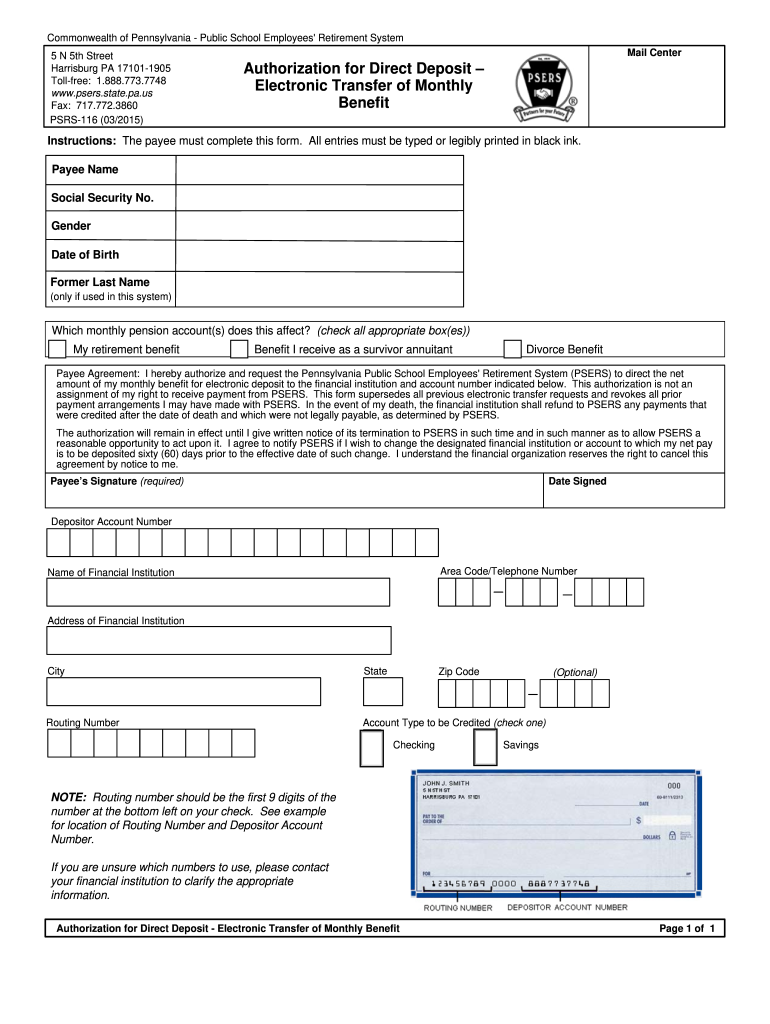
Mail Center Authorization for Direct Deposit – Electronic Transfer of Monthly Benefit Instructions: The payee must complete this form. All entries must be typed or legibly printed in black ink. Payee Name Social Security No. Gender Date of Birth Former Last Name (only if used in this system) Which monthly pension account(s) does this affect? (check all appropriate box(es)) My retirement benefit Benefit I receive as a survivor annuitant Divorce Benefit Payee Agreement: I hereby authoriz.
Loading

Open form follow the instructions

Easily sign the form with your finger

Send filled & signed form or save
How to fill out the PA PSRS-116 online
This guide provides clear and concise instructions on how to successfully complete the PA PSRS-116 form for direct deposit of monthly benefits. Whether you are familiar with digital forms or new to the process, this comprehensive guide will assist you in filling out the form accurately.
Follow the steps to complete the PA PSRS-116 form accurately.
- Click ‘Get Form’ button to obtain the form and open it in your preferred online editor.
- Begin by entering your payee name in the designated field. Ensure that your name is accurately typed or legibly printed in black ink.
- Provide your Social Security number as required. Double-check for accuracy to prevent any processing issues.
- Select your gender by checking the appropriate box. This is important for record-keeping purposes.
- Input your date of birth. Be sure to format it correctly as requested.
- If applicable, fill in your former last name in the specified field, only if it was used in the system.
- Next, indicate which monthly pension account(s) this form pertains to by checking all appropriate box(es) such as 'My retirement benefit', 'Benefit I receive as a survivor annuitant', or 'Divorce Benefit'.
- Read the payee agreement statement carefully and confirm your understanding of its terms regarding the authorization for electronic deposit.
- Sign the form in the designated area to complete the Payee's Signature. This signature is required.
- Indicate the date you signed the form.
- Enter your depositor account number as required in the appropriate field.
- Provide your area code and telephone number for contact purposes.
- List the name of your financial institution in the corresponding field.
- Fill in the address of your financial institution including city, state, and zip code.
- Input the routing number, which should consist of the first 9 digits located at the bottom left of your check.
- Select the account type to be credited by checking either ‘Checking’ or ‘Savings’.
- Once all fields are completed, save your changes. You will have the option to download, print, or share the form as needed.
Ensure your financial benefits are deposited directly to your account by completing the PA PSRS-116 form online today.
Experience a faster way to fill out and sign forms on the web. Access the most extensive library of templates available.
Related content
... (PSRS-116) form. It is critical that the information is completed in full and that the...
Over 30 months, PA-PSRS received reports of 116 wrong-site surgery events in which a...
• Utilize apenas o adaptador especificado (PA-300, PA-301 ou outro equivalente ... 116...
Get answers to your most pressing questions about US Legal Forms API.
What is the average pension for a PA state employee?
The average pension for a Pennsylvania state employee varies, influenced by factors like years of service and salary level. Generally, retirees under PA PSRS-116 can expect an average pension that reflects their career earnings. Understanding your potential benefit amount can aid in financial planning for retirement. If you would like to explore average pension figures in detail, USLegalForms has resources for further research.
Why did PSERS send me a check?
Receiving a check from PSERS may indicate various adjustments to your account, possibly relating to overpayments, adjustments in your benefits, or payments for retirement-related services. If you are unsure why you received a check, reviewing your statements under the PA PSRS-116 framework can provide clarity. For assistance in understanding these transactions, you can refer to resources available on USLegalForms that help demystify pension-related communications.
How do I change my direct deposit on PSERS?
Changing your direct deposit with PSERS is a straightforward process. You can modify your banking information online through your member account or complete a direct deposit authorization form. It's vital to ensure your payments are sent to the correct account, especially when managing your benefits through PA PSRS-116. For detailed instructions and helpful resources, USLegalForms offers easy access to the necessary forms.
How to change address with PSERS?
To change your address with the Pennsylvania Public School Employees' Retirement System (PSERS), log into your member account online or complete a mailing address change form. It is essential to keep your information current to ensure you receive important communications regarding your pension, especially when benefits are managed under PA PSRS-116. For further guidance on the process, visit the USLegalForms website for downloadable forms and instructions.
How is PA state pension calculated?
Calculating your Pennsylvania state pension involves several factors, including your years of service, your average final salary, and the retirement plan you are under. Generally, your pension is based on a formula that takes these elements into account, allowing you to receive a benefit suited to your service. Understanding the specifics of PA PSRS-116 can help you estimate your potential retirement income accurately. For personalized calculations, consider using resources available on platforms like USLegalForms.
How long does it take to be fully vested in PSERS?
To be fully vested in the Pennsylvania State Employees' Retirement System (PSERS), you need to serve for a minimum of five years. The PA PSRS-116 clearly outlines these requirements. Being vested means you can claim your pension benefits upon retirement, and understanding this timeline is essential for your financial planning.
Is PSERS pension for life?
Yes, the PSERS pension is designed to provide lifetime benefits to eligible retirees. Once you reach the required service and retirement age, the PA PSRS-116 ensures that your pension continues for your lifetime. This provision gives teachers peace of mind, knowing they will have a reliable income during retirement.
How long do you have to be a teacher in PA to get a pension?
Teachers in Pennsylvania must work for a minimum of five years to qualify for a pension through the Pennsylvania State Education Retirement System. The PA PSRS-116 acts as a regulatory framework for this process, ensuring your contributions lead to valuable retirement benefits. Continuously educating yourself on this topic can help you maximize your retirement outcomes.
How many years do you have to work to get a pension in Pennsylvania?
To qualify for a pension in Pennsylvania, you typically need to work for at least five years. This requirement aligns with the PA PSRS-116 guidelines, establishing a foundation for your future benefits. It's beneficial to stay informed about your service credits, as these directly impact your pension eligibility and future financial security.
How many years to be vested in Pennsylvania Teachers' pension?
In Pennsylvania, you need to earn at least five years of service to be fully vested in the Pennsylvania Teachers' pension plan. This is a crucial step, as being vested means you are entitled to receive benefits once you reach retirement age. It's important to understand the implications of the PA PSRS-116 as it outlines the requirements and ensures that your contributions work for you in the long term.
Use professional pre-built templates to fill in and sign documents online faster. Get access to thousands of forms.
If you believe that this page should be taken down, please follow our DMCA take down process here.