Loading
Get Da 7382 2005-2026
How it works
-

Open form follow the instructions
-

Easily sign the form with your finger
-

Send filled & signed form or save
How to fill out the DA 7382 online
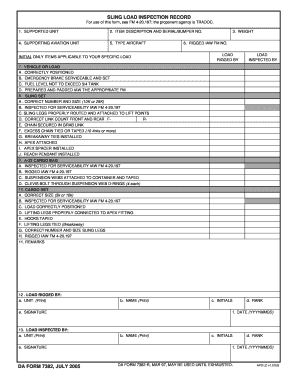
Filling out the DA 7382 form accurately is essential for documenting sling load inspections. This guide will provide clear instructions on how to complete this form online, ensuring all necessary sections are filled out correctly.
Follow the steps to fill out the DA 7382 form online.
- Click ‘Get Form’ button to obtain the DA 7382 form and open it in your preferred editor.
- Begin with Section 1, 'Supported Unit'. Enter the name of the unit conducting the sling load operation.
- In Section 2, 'Item Description and Serial/Bumper No.', provide a detailed description along with the relevant serial or bumper number of the item being inspected.
- For Section 4, 'Supporting Aviation Unit', enter the name of the aviation unit providing support.
- In Section 5, 'Type Aircraft', specify the type of aircraft involved in the operation.
- Section 3, 'Weight', requires you to input the total weight of the load being inspected. Ensure this is accurate.
- Fill out Section 6, 'Rigged IAW FM No.', by indicating the applicable field manual number used for rigging the load.
- Complete the 'Load Rigged By' subsection and provide your initials, name, and signature.
- Continue with the various checks in Section 7 through 10, ensuring each point has been checked and initialed by the respective individuals responsible for inspection. This includes verifying load positioning, sling set, A-22 cargo bag, and cargo net details.
- After reviewing all sections, move to the 'Remarks' section (11) to add any additional notes or observations relevant to the inspection.
- Finalize the form by filling out Section 12 for both the load rigged by and load inspected by, which includes printing names, ranks, initials, signatures, and the date in YYYYMMDD format.
- Once all fields and sections are completed, save your changes, download, print the document, or share it as required.
Start filling out your documents online today to ensure efficiency and accuracy.
Probably the server is overloaded, down or unreachable because of a network problem, outage or a website maintenance is in progress... Having Problems with Accessing Armypubs.army.mil?