Loading
Get Nv Mld Form 1000 2019
How it works
-

Open form follow the instructions
-

Easily sign the form with your finger
-

Send filled & signed form or save
How to fill out the NV MLD Form 1000 online
Filling out the NV MLD Form 1000 is an important step for individuals wishing to file a complaint with the Nevada Division of Mortgage Lending. This guide provides step-by-step instructions to help users easily complete the form online, ensuring all necessary information is provided.
Follow the steps to successfully complete the online NV MLD Form 1000
- Click ‘Get Form’ button to obtain the form and open it in the editor.
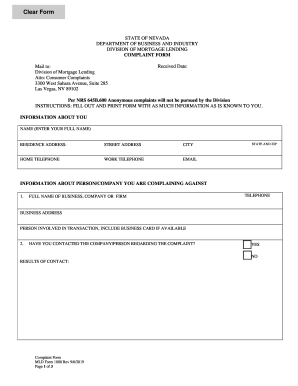
- Begin by entering your full name in the 'Name' field. Ensure that you provide your residence address, including street address, city, state, zip code, and both home and work telephone numbers, as well as your email address.
- Next, fill in the information about the person or company you are complaining against. Include the full name of the business or firm, their telephone number, and their business address. If applicable, mention the person involved in the transaction.
- Indicate whether you have contacted the company or person regarding the complaint by selecting either 'Yes' or 'No.' If you answered 'Yes,' include the results of that contact.
- If you have filed this complaint with another law enforcement or consumer protection agency, select 'Yes' or 'No.' If 'Yes,' complete the required agency name, address, and the results of that complaint.
- Specify whether you are willing to appear as a witness by selecting 'Yes' or 'No.' If 'No,' provide your reasons in the space provided.
- In the 'Nature of Complaint' section, describe the facts of your complaint. Ensure to detail the date of the transaction, actions that resulted in the complaint, and your attempts to resolve the issue with the company. Include names of individuals you have spoken to and summaries of your conversations.
- Finally, ensure you sign and date the form. Remember that any unsigned, incomplete, or illegible complaints will not be processed.
- Review the completed form for accuracy and completeness before saving your changes. You can then download, print, or share the form as necessary.
Take the next step in resolving your complaint by completing the NV MLD Form 1000 online today.