Loading
Form preview
  • US Legal Forms
  • Form Library
  • Other Forms
  • Oklahoma Other Forms
  • Ok Pocket Resume

Get Ok Pocket Resume

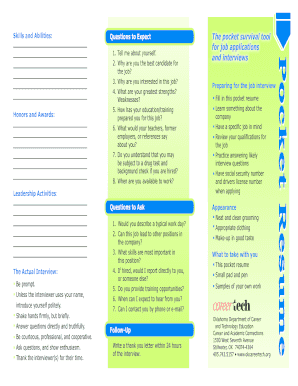
Ses? 5 . How has your education/training prepared you for this job? 6 . What would your teachers, former employers, or references say about you? 7 . Do you understand that you may be subject to a drug test and background check if you are hired? 8 . When are you available to work? Leadership Activities: Questions to Ask The Actual Interview: Be prompt. Unless the interviewer uses your name, introduce yourself politely. Shake hands firmly, but briefly. Answer questio.

How it works

  1. Open form

    Open form follow the instructions

  2. Easily sign form

    Easily sign the form with your finger

  3. Share form

    Send filled & signed form or save

How to fill out the OK Pocket Resume online

The OK Pocket Resume is a valuable tool for job seekers, designed to help present your qualifications effectively. This guide provides a clear and supportive framework to assist you in completing the form online, ensuring you capture your skills and experiences comprehensively.

Follow the steps to fill out the OK Pocket Resume effectively.

  1. Press the ‘Get Form’ button to obtain the OK Pocket Resume and open it in your preferred editor.
  2. Begin with the 'Name' section by entering your first and last name. Make sure this is clearly printed to avoid any confusion.
  3. Fill in your 'Address,' including the street, city, state, and zip code. Ensure all details are accurate to maintain proper communication.
  4. In the 'Telephone' section, provide your phone number, including the area code, for potential employers to reach you.
  5. Complete the 'WorkKeys Level' and 'WorkKeys Scores' fields as required. This information highlights your skills evaluation.
  6. Detail your 'Education' experience by listing levels of education alongside the names and locations of schools attended, and include dates of attendance and any certifications earned.
  7. Summarize your 'Experience' by including details of previous jobs, volunteer positions, or training experiences. Provide dates, employer information, the position held, salary, and reasons for leaving.
  8. List 'References' who are not related to you. Include their name, relationship to you, and contact information.
  9. Review all the information you have entered for accuracy and completeness before proceeding to the final steps.
  10. Once satisfied with your input, you can save your changes, download the completed resume, print it out, or share it as needed.

Start crafting your OK Pocket Resume online today to enhance your job application process.

Get form

Experience a faster way to fill out and sign forms on the web. Access the most extensive library of templates available.
Get form

Related content

pocket-resume - Oklahoma.gov
Tell me about yourself. 2. Why are you the best candidate for the job? 3. Why are you...
Learn more
Resumes, Cover Letters and Interviews
Jan 10, 2014 — You can get your resume and/or cover letter reviewed, practice your...
Learn more
POCKET MEMO
When you stop speaking, the Digital Pocket Memo will automatically pause recording after...
Learn more

Related links form

Dhbvn Bill 2020 Saps Application Form Closing Date 2020 Cvs Specialty 8772877226 2020 Epdcl Name Change 2020

Questions & Answers

Get answers to your most pressing questions about US Legal Forms API.

Contact support

If you don't have a resume, consider using the OK Pocket Resume template from US Legal Forms to help you create one from scratch. Start by listing your education, experiences, and skills. This way, you can build a strong foundation that properly showcases your qualifications.

Creating a PDF version of your OK Pocket Resume is simple. Most online resume builders, like those offered by US Legal Forms, allow you to easily export your resume as a PDF. Just ensure that you double-check the formatting to maintain a professional appearance.

To get your OK Pocket Resume picked up, start by customizing it for each application to reflect the skills and experiences that align with the job. Make use of popular keywords and phrases that employers seek. Lastly, consider using US Legal Forms for templates and guidance on what to include in your resume.

Your OK Pocket Resume may not be picked up if it lacks specific keywords relevant to the jobs you are targeting. Other factors include formatting issues that could confuse applicant tracking systems or a mismatch in qualifications. Regularly updating your resume can also help maintain its relevance.

To increase the chances of your OK Pocket Resume being picked up, ensure that it is tailored to fit the job you are applying for. Use relevant keywords from the job description and highlight your key skills. Additionally, submitting your resume through platforms that optimize for applicant tracking systems can enhance visibility.

In the About Me section of your resume, focus on presenting a brief summary of your professional background, skills, and what you offer as a candidate. Aim to highlight your experiences that align with the job you want, and ensure your personality shines through. The OK Pocket Resume provides a platform to present this information succinctly and effectively.

To politely check up on a job, you could express gratitude in your message. Something like, 'Thank you for considering my application. I would like to check in on the status of my OK Pocket Resume for the position I applied for.' This shows respect for their time while indicating your enthusiasm.

When checking on a resume, you might say, 'I hope this message finds you well. I’m following up on my application for the position and would appreciate any update regarding my OK Pocket Resume.' This friendly tone invites communication while demonstrating your continued interest.

If you want to inquire about your resume status, consider phrasing it as, 'Could you please provide an update on my OK Pocket Resume?' This wording not only communicates your request clearly but also reflects your professionalism and eagerness to learn more.

The 3 F's of resume writing are Format, Focus, and Facts. First, establish a clean and organized format to enhance readability. Next, maintain focus on relevant information and tailor your OK Pocket Resume to the job you seek. Finally, support your claims with factual data to strengthen your application.

Get This Form Now!

Use professional pre-built templates to fill in and sign documents online faster. Get access to thousands of forms.
Get form
If you believe that this page should be taken down, please follow our DMCA take down processhere.

Industry-leading security and compliance

US Legal Forms protects your data by complying with industry-specific security standards.
  • In businnes since 1997
    25+ years providing professional legal documents.
  • Accredited business
    Guarantees that a business meets BBB accreditation standards in the US and Canada.
  • Secured by Braintree
    Validated Level 1 PCI DSS compliant payment gateway that accepts most major credit and debit card brands from across the globe.
Get OK Pocket Resume
Get form
  • Adoption
  • Bankruptcy
  • Contractors
  • Divorce
  • Home Sales
  • Employment
  • Identity Theft
  • Incorporation
  • Landlord Tenant
  • Living Trust
  • Name Change
  • Personal Planning
  • Small Business
  • Wills & Estates
  • Packages A-Z
  • Affidavits
  • Bankruptcy
  • Bill of Sale
  • Corporate - LLC
  • Divorce
  • Employment
  • Identity Theft
  • Internet Technology
  • Landlord Tenant
  • Living Wills
  • Name Change
  • Power of Attorney
  • Real Estate
  • Small Estates
  • Wills
  • All Forms
  • Forms A-Z
  • Form Library
  • Legal Hub
  • About Us
  • Help Portal
  • Legal Resources
  • Blog
  • Affiliates
  • Contact Us
  • Delete My Account
  • Site Map
  • Industries
  • Forms in Spanish
  • Localized Forms
  • State-specific Forms
  • Forms Kit
  • Real Estate Handbook
  • All Guides
  • Notarize
  • Incorporation services
  • For Consumers
  • For Small Business
  • For Attorneys
  • USLegal
  • FormsPass
  • pdfFiller
  • signNow
  • altaFlow
  • DocHub
  • Instapage
Form Packages
  • Adoption
  • Bankruptcy
  • Contractors
  • Divorce
  • Home Sales
  • Employment
  • Identity Theft
  • Incorporation
  • Landlord Tenant
  • Living Trust
  • Name Change
  • Personal Planning
  • Small Business
  • Wills & Estates
  • Packages A-Z
Form Categories
  • Affidavits
  • Bankruptcy
  • Bill of Sale
  • Corporate - LLC
  • Divorce
  • Employment
  • Identity Theft
  • Internet Technology
  • Landlord Tenant
  • Living Wills
  • Name Change
  • Power of Attorney
  • Real Estate
  • Small Estates
  • Wills
  • All Forms
  • Forms A-Z
  • Form Library
Customer Service
  • Legal Hub
  • About Us
  • Help Portal
  • Legal Resources
  • Blog
  • Affiliates
  • Contact Us
  • Delete My Account
  • Site Map
  • Industries
  • Forms in Spanish
  • Localized Forms
  • State-specific Forms
  • Forms Kit
Legal Guides
  • Real Estate Handbook
  • All Guides
Prepared for you
  • Notarize
  • Incorporation services
Our Customers
  • For Consumers
  • For Small Business
  • For Attorneys
Our Sites
  • USLegal
  • FormsPass
  • pdfFiller
  • signNow
  • altaFlow
  • DocHub
  • Instapage
Social Media
Call us now toll free:
+1 833 426 79 33
As seen in:
© Copyright 1999-2026 airSlate Legal Forms, Inc. 3720 Flowood Dr, Flowood, Mississippi 39232
  • Your Privacy Choices
  • Terms of Service
  • Privacy Notice
  • Content Takedown Policy
  • Bug Bounty Program