Loading
Get Sit300 - Fill Online, Printable, Fillable, Blankpdffiller
How it works
-

Open form follow the instructions
-

Easily sign the form with your finger
-

Send filled & signed form or save
How to use or fill out the Sit300 - Fill Online, Printable, Fillable, BlankpdfFiller online
Filling out the Sit300 form online can streamline your account management and ensure accurate information submission. This guide provides a clear, step-by-step approach to successfully completing the form, catering to users with varying levels of experience.
Follow the steps to complete the Sit300 form effectively.
- Click the ‘Get Form’ button to obtain the form and open it in your preferred editor.
- Begin with the Account Number and Account Name sections. Fill in your unique account number and the name associated with the account for reference.
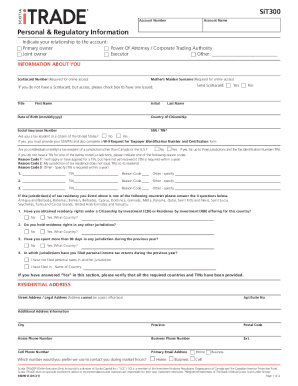
- In the Personal & Regulatory Information section, select your relationship to the account. Options include primary owner, joint owner, power of attorney, and executor. If applicable, specify any other relevant title.
- Provide your Scotiacard number and your mother’s maiden surname for verification. If you need a new Scotiacard, check the appropriate box.
- Complete the INFORMATION ABOUT YOU section. Input your title, first name, middle initial (if applicable), date of birth, last name, citizenship country, social insurance number, and any necessary SSN/TIN details.
- Indicate your tax residency status, specifically if you are a resident or citizen of the United States, and provide required TINs or reason codes if applicable.
- Fill out the RESIDENTIAL ADDRESS section with your legal address, including street, city, province, postal code, and contact numbers. Indicate your preferred contact number during market hours.
- Move to the EMPLOYMENT INFORMATION section and select your employment status. Fill out related fields including employer, industry, occupation, and whether you are employed by the Scotiabank Group.
- Detail your annual income and net worth in the respective sections, providing accurate numbers to reflect your financial status.
- Complete the INFORMATION REQUIRED BY SECURITIES REGULATORS AND COMPLIANCE section by answering questions regarding insider status and any control positions.
- Fill in your marital status and, if applicable, provide your spouse's details in the INFORMATION ABOUT YOUR SPOUSE section.
- Select your identification document type, complete the identification document number, and ensure to attach the necessary photo ID and Identity Verification form (SiT200) upon submission.
- Finally, sign and date the form to validate your submission. Review the form for any errors or omissions before finalizing.
- Users can save changes, download, print, or share the completed form as needed.
Complete your documentation online today for a seamless experience.