Loading
Get Eln Data Fields Form - Pa Keys - Pakeys
How it works
-

Open form follow the instructions
-

Easily sign the form with your finger
-

Send filled & signed form or save
How to fill out the ELN Data Fields Form - PA Keys - Pakeys online
This guide provides clear, step-by-step instructions on how to accurately complete the ELN Data Fields Form - PA Keys - Pakeys online. It aims to simplify the process for users of all experience levels, ensuring that all necessary information is collected effectively.
Follow the steps to complete the form efficiently.
- Click the ‘Get Form’ button to access the ELN Data Fields Form and open it in your online editing tool.
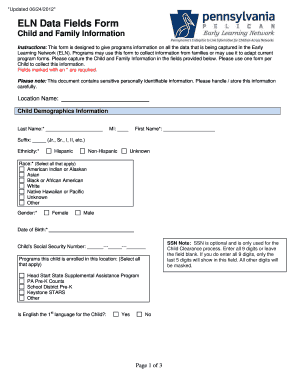
- Begin by filling out the Location Name field at the top of the form. Ensure the name is accurate to reflect the setting in which the child is enrolled.
- Complete the Child Demographics Information section by entering the required details such as the last name, first name, middle initial, suffix, ethnicity, race, gender, and date of birth. Remember that fields marked with an asterisk (*) are mandatory.
- If applicable, enter the child's Social Security Number. Note that this field is optional but may be needed for clearance processes. If entered, only the last five digits will be visible.
- Indicate the programs the child is enrolled in by selecting all applicable options. Choose from options such as Head Start, PA Pre-K Counts, or any other relevant programs.
- Answer whether English is the child's first language by selecting 'Yes' or 'No'.
- Move on to fill out the Legal Guardian Information, entering details for the guardian residing at the child's primary residence first. Other guardians can be added as needed.
- Ensure you complete fields for the legal guardian's last name, first name, gender, relationship to the child, and address. Some fields are not required, so select ‘Not Required’ where applicable.
- In the Child Enrollment Information section, you will need to complete a table for each classroom the child is enrolled in. Fill in the classroom session name, physical room, start and end dates, and select the applicable program and funding source.
- Finally, review all entered information for accuracy. Once confirmed, you can save changes, download, print, or share the completed form as needed.
Start your online form completion now and ensure you collect all necessary information efficiently.
Call 1-800-284-6031 or email registry@pakeys.org.
Industry-leading security and compliance
US Legal Forms protects your data by complying with industry-specific security standards.
-
In businnes since 199725+ years providing professional legal documents.
-
Accredited businessGuarantees that a business meets BBB accreditation standards in the US and Canada.
-
Secured by BraintreeValidated Level 1 PCI DSS compliant payment gateway that accepts most major credit and debit card brands from across the globe.