Loading
Form preview
  • US Legal Forms
  • Form Library
  • More Forms
  • More Multi-State Forms
  • Dol Wh-347 Report

Get Dol Wh-347 Report

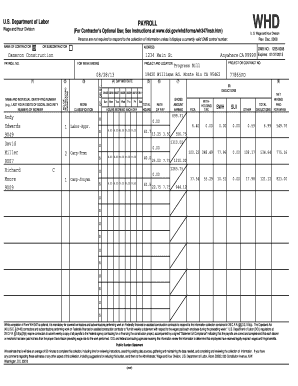
U.S. Department of Labor WHD PAYROLL Wage and Hour Division (For Contractor 's Optional Use; See Instructions at www.dol.gov/whd/forms/wh347instr.htm) U. S. Wage and Hour Division Persons are not.

How it works

  1. Open form

    Open form follow the instructions

  2. Easily sign form

    Easily sign the form with your finger

  3. Share form

    Send filled & signed form or save

How to fill out the DOL WH-347 Report online

The DOL WH-347 Report is a crucial document for contractors and subcontractors working on federally funded construction projects. This guide provides clear and detailed instructions on how to complete this form online, ensuring you accurately report wages and maintain compliance.

Follow the steps to accurately fill out the DOL WH-347 Report online.

  1. Press the ‘Get Form’ button to access the DOL WH-347 form, which will open it in the online editor.
  2. Begin by filling out the 'Name of Contractor or Subcontractor' field. Provide the legal name of your business as it appears in official documents.
  3. In the 'Payroll No.' section, enter the specific payroll number assigned to the week you are reporting. This will help in organizing your payroll reports.
  4. Next, fill in the 'For Week Ending' date, indicating the last day of the reporting week.
  5. Complete the 'Project and Location' section with the name of the project and its physical address to accurately identify the project site.
  6. In the 'Name and Individual Identifying Number' field, list the names of all workers along with their individual identifying numbers, such as the last four digits of their Social Security numbers.
  7. Fill in the 'Work Classification' for each worker, specifying the job title corresponding to their duties.
  8. For each day of the week, record the total hours worked by each individual in the designated columns, ensuring accuracy for compliance.
  9. Specify the 'Rate of Pay' for each worker next to their name to clarify their compensation for the reported week.
  10. Complete the 'Gross Amount Earned' section for each worker, which reflects the total earnings before deductions.
  11. List any applicable deductions in the designated fields, including FICA, withholding tax, and any other pertinent deductions.
  12. Calculate the 'Total Deductions' and ensure this amount is accurately reflected to avoid discrepancies.
  13. Finally, determine the 'Net Wages Paid for Week' by subtracting total deductions from gross earnings for each worker.
  14. After entering all the required information, review the form for accuracy, and you may choose to save changes, download, print, or share the completed form depending on your needs.

Complete the DOL WH-347 Report online today to ensure compliance and accurate reporting.

Get form

Experience a faster way to fill out and sign forms on the web. Access the most extensive library of templates available.
Get form

Related content

WH-347 - US Department of Labor
by HWE DAY · Cited by 4 — U.S. Department of Labor. PAYROLL. (For Contractor's Optional...
Learn more
Government Contracts | U.S. Department of Labor
... optional payroll form WH-347 (with instructions), and Davis-Bacon survey data...
Learn more
Labor Compliance Manual - Metro
Aug 28, 2019 — Department of Labor form WH-347. ... compliance reports throughout the...
Learn more

Related links form

Student Scholarships 2011 - Great Southern Institute Of Technology - Gsinstitute Wa Edu Form 1A (ver 8 FY11 Report To Congress On The Implementation ... - The White... Study Skills Guide - Great Southern Institute Of Technology - Gsinstitute Wa Edu

Questions & Answers

Get answers to your most pressing questions about US Legal Forms API.

Contact support

In the event there has been no work performed during a given week on the project, the Statement of Non-Performance (“SNP”) can be filled out for that week. A subcontractor must submit a SNP or Certified Payroll Report for each week on the job until their scope of work is complete.

Step 5: Create a certified payroll report Sign into QuickBooks as the Primary Administrator. Make sure you're in single-user mode. Go to Reports, then select Employees & Payroll. Select More Payroll Reports in Excel, then Certified Payroll Report.

If you use QuickBooks Online Payroll, we don't support prevailing wages or certified payroll reports. If you use QuickBooks Desktop Payroll Enhanced or QuickBooks Desktop Payroll Assisted, see Certified Payroll on how to create a certified payroll report.

Certified Payroll is a company's accounting of everything paid out under a contract performed for a government client, while Wrap-Up Payroll is what a company has to report to their Workers Compensation Carrier for the state in which they are doing the work.

What is certified payroll reporting? Certified payroll reports confirm that contractors and subcontractors working on federally-funded projects are paying their employees prevailing wages in ance with the Davis-Bacon and Related Acts.

Certified payroll is a special weekly payroll report used by contractors who are working on federally funded projects. To meet your certified payroll requirements, you'll need to submit Form WH-347 to the Department of Labor every week.

A WH-347 is a document used for payroll purposes by the Department of Labor. This form is generally filled out for contractors who wish to submit their certified weekly hours and the amount they are owed. This form provides space for multiple employees to be listed under a contractor.

Certified Payroll Reporting is fully integrated with RUN Powered by ADP (RUN). Employee data and paycheck information flows directly from payroll onto prevailing wage reports.

Get This Form Now!

Use professional pre-built templates to fill in and sign documents online faster. Get access to thousands of forms.
Get form
If you believe that this page should be taken down, please follow our DMCA take down processhere.

Industry-leading security and compliance

US Legal Forms protects your data by complying with industry-specific security standards.
  • In businnes since 1997
    25+ years providing professional legal documents.
  • Accredited business
    Guarantees that a business meets BBB accreditation standards in the US and Canada.
  • Secured by Braintree
    Validated Level 1 PCI DSS compliant payment gateway that accepts most major credit and debit card brands from across the globe.
Get DOL WH-347 Report
Get form
  • Adoption
  • Bankruptcy
  • Contractors
  • Divorce
  • Home Sales
  • Employment
  • Identity Theft
  • Incorporation
  • Landlord Tenant
  • Living Trust
  • Name Change
  • Personal Planning
  • Small Business
  • Wills & Estates
  • Packages A-Z
  • Affidavits
  • Bankruptcy
  • Bill of Sale
  • Corporate - LLC
  • Divorce
  • Employment
  • Identity Theft
  • Internet Technology
  • Landlord Tenant
  • Living Wills
  • Name Change
  • Power of Attorney
  • Real Estate
  • Small Estates
  • Wills
  • All Forms
  • Forms A-Z
  • Form Library
  • Legal Hub
  • About Us
  • Help Portal
  • Legal Resources
  • Blog
  • Affiliates
  • Contact Us
  • Delete My Account
  • Site Map
  • Industries
  • Forms in Spanish
  • Localized Forms
  • State-specific Forms
  • Forms Kit
  • Real Estate Handbook
  • All Guides
  • Notarize
  • Incorporation services
  • For Consumers
  • For Small Business
  • For Attorneys
  • USLegal
  • FormsPass
  • pdfFiller
  • signNow
  • altaFlow
  • DocHub
  • Instapage
Form Packages
  • Adoption
  • Bankruptcy
  • Contractors
  • Divorce
  • Home Sales
  • Employment
  • Identity Theft
  • Incorporation
  • Landlord Tenant
  • Living Trust
  • Name Change
  • Personal Planning
  • Small Business
  • Wills & Estates
  • Packages A-Z
Form Categories
  • Affidavits
  • Bankruptcy
  • Bill of Sale
  • Corporate - LLC
  • Divorce
  • Employment
  • Identity Theft
  • Internet Technology
  • Landlord Tenant
  • Living Wills
  • Name Change
  • Power of Attorney
  • Real Estate
  • Small Estates
  • Wills
  • All Forms
  • Forms A-Z
  • Form Library
Customer Service
  • Legal Hub
  • About Us
  • Help Portal
  • Legal Resources
  • Blog
  • Affiliates
  • Contact Us
  • Delete My Account
  • Site Map
  • Industries
  • Forms in Spanish
  • Localized Forms
  • State-specific Forms
  • Forms Kit
Legal Guides
  • Real Estate Handbook
  • All Guides
Prepared for you
  • Notarize
  • Incorporation services
Our Customers
  • For Consumers
  • For Small Business
  • For Attorneys
Our Sites
  • USLegal
  • FormsPass
  • pdfFiller
  • signNow
  • altaFlow
  • DocHub
  • Instapage
Social Media
Call us now toll free:
+1 833 426 79 33
As seen in:
© Copyright 1999-2026 airSlate Legal Forms, Inc. 3720 Flowood Dr, Flowood, Mississippi 39232
  • Your Privacy Choices
  • Terms of Service
  • Privacy Notice
  • Content Takedown Policy
  • Bug Bounty Program