Loading
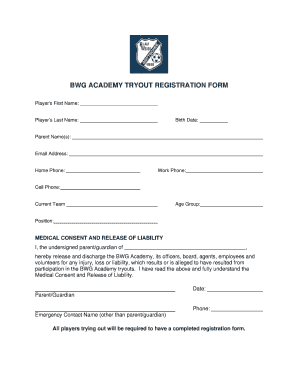
Get Tryout Permission Form (tryouts)
How it works
-

Open form follow the instructions
-

Easily sign the form with your finger
-

Send filled & signed form or save
How to fill out the Tryout Permission Form (Tryouts) online
Filling out the Tryout Permission Form (Tryouts) online is a straightforward process that ensures a smooth registration for players wishing to participate in tryouts. This guide will provide you with step-by-step instructions to complete the form accurately and efficiently.
Follow the steps to complete the Tryout Permission Form online.
- Click the ‘Get Form’ button to access the Tryout Permission Form and open it in your preferred document editor.
- Begin by entering the player's first name in the designated field. Ensure that the spelling is correct and matches the name on their identification documents.
- Next, enter the player's last name in the appropriate field. Similar to the first name, double-check for accuracy.
- Input the player's birth date using the specified format. This information is essential for determining the age group.
- Enter the names of the parent or guardian in the field provided. This identifies the individual responsible for permission and communication.
- Provide an email address for the parent or guardian, which will be used for any correspondence related to the tryouts.
- Fill in the home phone number of the parent or guardian. Specify any necessary area codes.
- Include the work phone number of the parent or guardian, if applicable.
- Enter a cell phone number for easy contact during tryout days.
- Specify the current team the player is part of, if applicable. This detail helps organizers coordinate tryouts.
- Select the appropriate age group for the player. This information is crucial for correct placement during the tryout process.
- Indicate the player's position in their current team, which helps coaches assess player skills and fit.
- In the medical consent and release of liability section, the parent or guardian must provide their name and date, confirming their understanding and acceptance of terms outlined.
- Ensure the emergency contact's name (who is not the parent/guardian) is filled in to provide additional safety.
- After verifying all entries for accuracy, users can save changes, download, print, or share the completed Tryout Permission Form as needed.
Complete your Tryout Permission Form online today for a hassle-free registration experience.
The Secret to Being a Stand-Out at Tryouts Be prepared: Lots of times coaches will request you to do something prior to the first tryout. ... Arrive early: ... Be in shape: ... Do your homework: ... Focus especially on defense: ... Pay attention/eye contact: ... Communicate on the court: ... Ask questions: