Loading
Get Az Joint Tax Application
How it works
-

Open form follow the instructions
-

Easily sign the form with your finger
-

Send filled & signed form or save
How to fill out the Az Joint Tax Application online
This guide provides a comprehensive overview of how to accurately fill out the Az Joint Tax Application online. By following the step-by-step instructions, users can ensure that their applications are completed correctly and submitted without errors.
Follow the steps to fill out the form effectively.
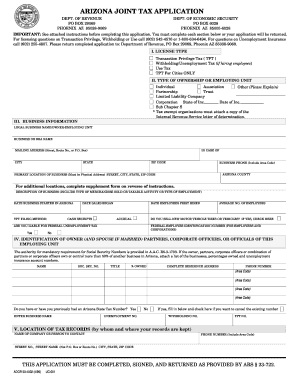
- Press the ‘Get Form’ button to access the Az Joint Tax Application, allowing you to open the form in your browser for online completion.
- Begin with Section I, where you will select the appropriate license type for your business, such as Transaction Privilege Tax (TPT) or Withholding/Unemployment Tax. Ensure you tick the box that corresponds to your business activities.
- In Section II, identify the type of ownership or employing unit. Choose from the provided options such as Individual, Partnership, or Corporation, and fill in the necessary details.
- Move on to Section III, wherein you must enter your business information. Include your legal business name, mailing address, and primary location of the business. Provide a description of your business and the date it started in Arizona.
- Section IV requires the identification of the owner(s) and any partners or corporate officers. Input their names, social security numbers, titles, and ownership percentages.
- In Section V, indicate the location of tax records. Provide the name of the individual or company to contact and their associated phone number.
- If applicable, complete Section VI regarding previous owners. This section is necessary if you acquired all or part of an existing business.
- Section VII is pertinent for those applying for withholding/unemployment tax licenses. Input the required employment information detailing wages paid and persons performing services.
- In Section IX, calculate and input the fees associated with your Transaction Privilege Tax license based on the number of business locations and city fees.
- Proceed to Section X to sign the application. Ensure that it is signed by an authorized individual, confirming the truth of the information provided.
- Finally, review all sections of the application for accuracy. Save your changes, and once everything is correct, download the form for your records or share it as needed.
Complete your Az Joint Tax Application online today to ensure compliance and streamline your business operations.
You can access forms on the website anytime, at .azdor.gov/forms. In our lobbies. In each of our three lobbies, you will find tax booklets for your convenience to take home and use. Free Tax Return Preparation Services.