Loading
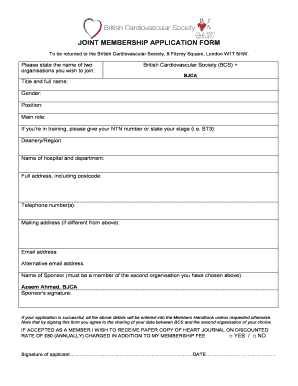
Get Bjca Bcs Joint Membership Form.doc
How it works
-

Open form follow the instructions
-

Easily sign the form with your finger
-

Send filled & signed form or save
How to fill out the BJCA BCS Joint Membership Form.doc online
Completing the BJCA BCS Joint Membership Form online is a straightforward process that facilitates your application for joint membership with the British Cardiovascular Society and the BJCA. This guide will walk you through the essential steps to ensure you fill out the form accurately and efficiently.
Follow the steps to complete your application successfully.
- Click the ‘Get Form’ button to obtain the form and open it in an online editor.
- In the first section, state the names of the two organizations you wish to join: British Cardiovascular Society (BCS) and BJCA.
- Please fill in your title and full name in the corresponding fields.
- Indicate your gender in the designated area.
- Provide your position and main role as it pertains to your professional work.
- If you are currently in training, please include your NTN number or specify your training stage (e.g., ST3) and select your deanery or region.
- Fill in the name of your hospital and department.
- Complete your full address, making sure to include the postcode.
- Include your telephone number(s) in the appropriate field.
- If your mailing address differs from your full address, provide it in the space provided.
- Enter your email address and an alternative email address if available.
- Provide the name of your sponsor, ensuring it is a member of the second organization you have chosen.
- Obtain and include your sponsor's signature.
- Confirm whether you wish to receive the paper copy of the Heart Journal at a discounted rate by selecting 'YES' or 'NO.'
- Sign and date the application form to affirm your consent. Note that by signing, you agree to the sharing of your data between BCS and BJCA.
- For the direct debit section, fill in your bank details. Complete the name(s) of account holder(s), account number, and branch sort code.
- Include the name and full postal address of your bank or building society, including the manager's title.
- Finally, ensure all sections are correctly filled out, then save your changes, download the form, and print or share as necessary.
Start completing your BJCA BCS Joint Membership Form online today!
Industry-leading security and compliance
US Legal Forms protects your data by complying with industry-specific security standards.
-
In businnes since 199725+ years providing professional legal documents.
-
Accredited businessGuarantees that a business meets BBB accreditation standards in the US and Canada.
-
Secured by BraintreeValidated Level 1 PCI DSS compliant payment gateway that accepts most major credit and debit card brands from across the globe.