Loading
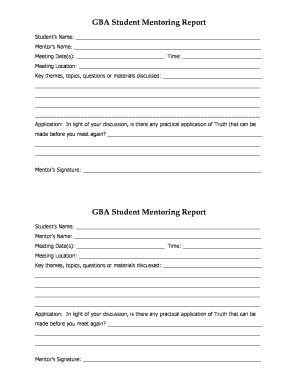
Get Gba Student Mentoring Report Form (monthly) - Gracechatt
How it works
-

Open form follow the instructions
-

Easily sign the form with your finger
-

Send filled & signed form or save
How to fill out the GBA Student Mentoring Report Form (Monthly) - Gracechatt online
The GBA Student Mentoring Report Form is an essential tool for documenting mentor-student interactions. This guide provides clear and structured steps to assist users in effectively completing the form online.
Follow the steps to accurately complete the form online.
- Press the ‘Get Form’ button to access the form and open it in your preferred editor.
- Begin filling out the ‘Student’s Name’ field with the full name of the student participating in the mentoring program.
- In the ‘Mentor’s Name’ section, enter the full name of the mentor assigned to the student.
- Fill in the ‘Meeting Date(s)’ with the specific dates of your mentoring meetings, and note the time in the ‘Time’ field.
- Specify the ‘Meeting Location’ where the mentoring sessions take place, whether physical or virtual.
- Under ‘Key themes, topics, questions or materials discussed’, provide a detailed summary of the main topics covered during the mentoring meetings. Be thorough to capture important points for future reference.
- In the ‘Application’ section, describe any practical applications of concepts discussed that can be implemented before your next meeting. This reflection helps in reinforcing learnings.
- Finally, the mentor should sign the form in the ‘Mentor’s Signature’ field to validate the report.
- Once all fields are completed, you can save your changes, download a copy for your records, print the report, or share it with relevant parties.
Complete your GBA Student Mentoring Report Form online today for an organized documentation of your mentoring experience.