Loading
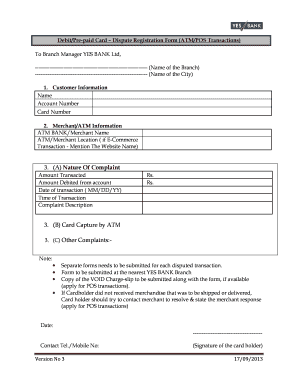
Get Debit / Prepaid Card Dispute Registration Form ( Atm ... - Yes Bank - Yesbank
How it works
-

Open form follow the instructions
-

Easily sign the form with your finger
-

Send filled & signed form or save
How to fill out the Debit / Prepaid Card Dispute Registration Form (ATM ... - Yes Bank - Yesbank online
Filling out the Debit / Prepaid Card Dispute Registration Form is essential for resolving any discrepancies related to your transactions. This guide provides a detailed, step-by-step process to help you complete and submit the form accurately.
Follow the steps to successfully complete your dispute registration form.
- Press the ‘Get Form’ button to retrieve the Debit / Prepaid Card Dispute Registration Form. Ensure that you have the document open in an editable format.
- Start by providing your customer information. Fill in your name, account number, and card number accurately to verify your identity.
- In the Merchant/ATM Information section, specify the name of the bank or merchant involved in the transaction. If it’s an e-commerce transaction, include the website name as well.
- For the Nature of Complaint section, enter the amount that was transacted and the amount debited from your account. Include the date and time of the transaction to assist with the investigation.
- Describe the complaint in detail in the Complaint Description field. Be clear and concise to ensure that your concerns are understood.
- If applicable, complete the Card Capture by ATM section, and provide details for any other complaints you may have.
- Note that separate forms are required for each disputed transaction. If available, attach a copy of the VOID charge slip for POS transactions.
- If you did not receive merchandise that was supposed to be delivered, make an attempt to contact the merchant for resolution and include their response in the form.
- Finally, write the date, provide your contact number, and ensure that you sign the form as the cardholder before submission.
- Once you have filled out the form, save any changes, and consider downloading or printing it for your records before submitting it at your nearest Yes Bank branch.
Complete your documents online today to ensure a smooth dispute resolution process.
YES ONLINE (NetBanking) Login to YES ONLINE. Go to Credit Cards tab → Select Credit card transaction Control → Transaction Control → Select Card Number. Select transaction control of your choice and set domestic/international per transaction limit. Click on proceed and confirm the changes with OTP validation.
Industry-leading security and compliance
US Legal Forms protects your data by complying with industry-specific security standards.
-
In businnes since 199725+ years providing professional legal documents.
-
Accredited businessGuarantees that a business meets BBB accreditation standards in the US and Canada.
-
Secured by BraintreeValidated Level 1 PCI DSS compliant payment gateway that accepts most major credit and debit card brands from across the globe.