Loading
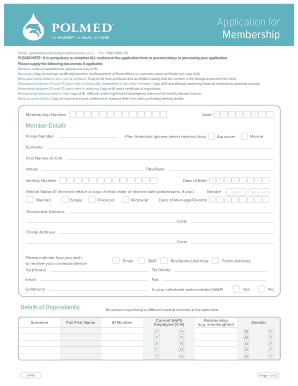
Get Polmed Medscheme Co Za
How it works
-

Open form follow the instructions
-

Easily sign the form with your finger
-

Send filled & signed form or save
How to fill out the Polmed Medscheme Co Za online
Filling out the Polmed Medscheme Co Za application for membership is an essential step in ensuring your access to medical benefits. This guide provides clear, step-by-step instructions to help you complete the application accurately and efficiently.
Follow the steps to complete your application form.
- Press the ‘Get Form’ button to access the application document and open it for editing.
- Fill in your member details in the designated fields, including your surname, first names, initials, title or rank, date of birth, identity number, marital status, and gender.
- Provide your residential address and postal address along with corresponding postal codes. Indicate how you wish to receive correspondence by selecting email or SMS.
- List your dependants and provide their details, including their surnames, first names, identity numbers, and relationships to you. Ensure you complete all necessary fields, especially regarding their gender and current SAPS employee status.
- Specify your income category by indicating your basic monthly salary/income and attaching copies of relevant documents, such as payslips if required.
- Input your banking account details accurately, including bank account number, name of the bank, branch number, and type of account for payment processing.
- Complete the section regarding previous medical scheme memberships, providing the name of the medical scheme and the period of membership. If applicable, mention your previous membership number with POLMED.
- Answer the health questions about chronic medication and pre-existing medical conditions, ensuring that you provide accurate and thorough information.
- Complete the consent and declaration section, affirming the truthfulness of the information provided and authorizing necessary agreements.
- Finally, review all entries for accuracy and completeness. Once confirmed, you can save your changes, download, print, or share the application form as needed.
Start filling out your Polmed Medscheme Co Za application online today to access your medical benefits!
Simply download Polmed Chat free from the following link: http://bit.ly/1YHAtwu or via your mobile app store and start chatting! COMPUTERS - This service is also available to registered users in the logged-in zone on the Polmed website by clicking on the Polmed Chat widget/icon.