Loading
Get Cosmetology Tax Worksheet
How it works
-

Open form follow the instructions
-

Easily sign the form with your finger
-

Send filled & signed form or save
How to fill out the Cosmetology Tax Worksheet online
Completing the Cosmetology Tax Worksheet online can be a straightforward process if you follow the steps outlined below. This guide will assist you in accurately filling out the necessary components for filing your taxes as a beauty professional.
Follow the steps to fill out the Cosmetology Tax Worksheet online.
- Press the ‘Get Form’ button to access the worksheet and open it in the editing interface.
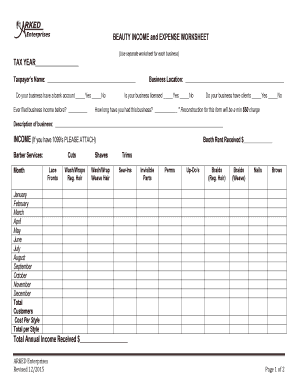
- Begin by entering the tax year at the top of the form. This is crucial as it determines the period relevant to your income and expenses.
- Fill in your name in the 'Taxpayer’s Name' field to identify the tax return with your identity.
- Indicate whether your business has a bank account by checking the corresponding box for 'Yes' or 'No'. This can be important for tracking finances.
- State if you have ever filed business income before. This information helps tax authorities understand your business history.
- Provide the business location in the designated field. This gives context to your business operations.
- Indicate if your business is licensed by selecting 'Yes' or 'No'. Licensing can affect your tax obligations.
- Specify whether your business has clients. Again, select 'Yes' or 'No' as applicable.
- Fill in how long you have had this business in the specified field, giving insight into your business experience.
- Provide a description of your business in the blank section to clarify the nature of your services.
- For the income section, list each type of service you offer under 'INCOME', along with monthly figures for each service. Be sure to attach any 1099 forms if applicable.
- Calculate and enter the total annual income received in its designated space for your records.
- Move to the 'EXPENSES' section and enter your expenses categorized by month. Be thorough and accurate in documenting your costs.
- At the bottom of the expenses section, total up your expenses to understand your overall outgoings for the tax year.
- Indicate if you have a home office expense by checking 'Yes' or 'No' in the provided box.
- Lastly, ensure you sign and date the form to validate the information you have provided, confirming its accuracy under penalties of perjury.
- Once you have completed the worksheet, you can save your changes, download the form, print it, or share it as needed.
Start filling out your Cosmetology Tax Worksheet online today to stay organized and prepared for tax season.
Get form
Experience a faster way to fill out and sign forms on the web. Access the most extensive library of templates available.
Get This Form Now!
Use professional pre-built templates to fill in and sign documents online faster. Get access to thousands of forms.