Loading
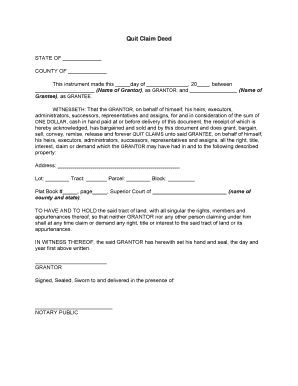
Get Downloadf A Blank Quick Claim Deed
How it works
-

Open form follow the instructions
-

Easily sign the form with your finger
-

Send filled & signed form or save
How to fill out the Downloadf A Blank Quick Claim Deed online
Filling out a blank quick claim deed can seem daunting, but with the right guidance, the process can be straightforward. This guide provides clear steps to help users complete the document accurately and efficiently.
Follow the steps to complete the quick claim deed form online.
- Click the ‘Get Form’ button to obtain the document and open it in the appropriate editor.
- Begin by noting the state and county at the top of the form, which indicates where the deed will be executed. Make sure to enter the correct jurisdiction.
- In the designated fields, input the date on which the document is being completed. Clearly write the day, month, and year.
- Next, fill in the name of the grantor (the person transferring the property) in the space labeled ‘Name of Grantor.’ Ensure the name is complete and accurately reflects the individual or entity.
- In the field labeled ‘Name of Grantee,’ enter the name of the individual or entity receiving the property. Again, accuracy is key.
- After those fields, you will see a section indicating the consideration, which is typically noted as ‘ONE DOLLAR’ for the purposes of the deed. This section confirms that the grantor acknowledges receipt of payment.
- Proceed to describe the property being transferred. Fill out the address, lot number, tract number, and block number in the respective fields. These details are essential for identifying the property.
- Include the plat book and page number, as well as the name of the county and state, to ensure that the property description is complete and legally binding.
- Once all pertinent details are entered, the grantor must sign the deed in the section marked ‘GRANTOR’ to validate the transfer.
- Finally, arrange for the document to be signed, sealed, and witnessed in the presence of a notary public. This step is crucial for the legal legitimacy of the quick claim deed.
- After completing the form, save your changes, and then you can download, print, or share the document according to your needs.
Complete your quick claim deed online efficiently today.
Maricopa County Recorder's Office has two full service offices to record your quitclaim deed. The main office is located in downtown Phoenix. The Southeast office is in Mesa, Arizona. Maricopa County Recorder's Offices are responsible for recording and maintaining permanent public records.