Loading
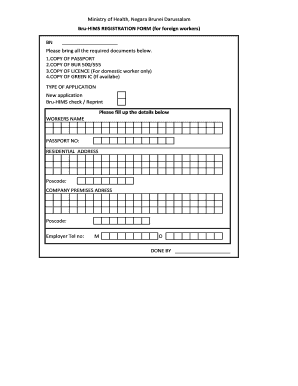
Get Bur 500 555
How it works
-

Open form follow the instructions
-

Easily sign the form with your finger
-

Send filled & signed form or save
How to fill out the Bur 500 555 online
Filling out the Bur 500 555 form online can be a straightforward process when you have the right guidance. This guide provides clear and supportive instructions to help you successfully complete your registration.
Follow the steps to complete the Bur 500 555 form online
- Click ‘Get Form’ button to access the form and open it in your preferred online editor.
- Begin by entering the worker's name in the designated field. Make sure to use the full name as it appears on the passport.
- Input the passport number accurately in the provided space, ensuring that all digits are correct.
- Fill out the residential address where the worker resides. Include all relevant details like street name and apartment number, if applicable.
- Enter the corresponding postcode for the residential address to ensure proper processing.
- Provide the company premises address in the next section, ensuring it reflects the location where the worker will be employed.
- Again, enter the postcode for the company premises to facilitate accurate registration.
- Include the employer's telephone number, making sure to specify the country code where necessary.
- Finalize the form by indicating whether it is a new application or a Bru-HIMS check/reprint, selecting the appropriate option.
- After completing all fields, thoroughly review the information for accuracy and completeness before saving.
- Once verified, you can save changes, download, print, or share the completed form as needed.
Start filling out your Bur 500 555 form online today!
Fill in the Foreign worker application form (LD) which can be downloaded here and submit to the Counter at Labour Department together with the standard required documents : Copy of the owners Identity Card/passport for all the company owners. A copy of the valid passport for every worker being applied for.