Loading
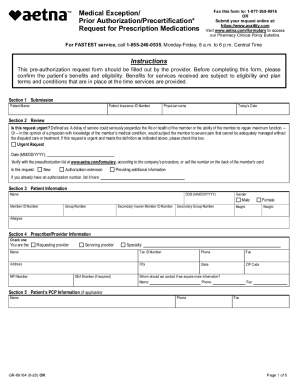
Get Aetna - Medical Exception/prior Authorization/precertification Request For Prescription
How it works
-

Open form follow the instructions
-

Easily sign the form with your finger
-

Send filled & signed form or save
How to fill out the Aetna - Medical Exception/Prior Authorization/Precertification Request For Prescription online
Filling out the Aetna Medical Exception/Prior Authorization/Precertification Request for Prescription form online is an essential step in ensuring that patients receive the necessary medications and treatments. This guide provides clear and detailed instructions for each section of the form, enabling users to complete it efficiently.
Follow the steps to successfully complete the online form.
- Press the ‘Get Form’ button to access the form and open it in your preferred editor.
- In Section 1, Submission, enter the patient’s name and insurance ID number. Include the physician’s name and today’s date.
- In Section 2, Review, indicate if this request is urgent by checking the appropriate box. Provide the date and select whether this request is for new authorization, an extension, or additional information. If applicable, include the existing authorization number.
- Section 3, Patient Information, requires the patient's name, date of birth, gender, member ID number, group number, secondary insurance member ID, secondary group number, height, weight, and any allergies.
- In Section 4, Prescriber/Provider Information, specify if you are the requesting or servicing provider. Fill in your specialty, name, tax ID number, phone, fax, address, city, state, ZIP code, NPI number, and DEA number if required.
- Section 5 asks for the patient's primary care provider's information, if applicable. Input their name and contact details.
- In Section 6, Medication/Medical & Dispensing Information, specify whether it's a new therapy or renewal, the route of administration, medication name, dose/strength, frequency, length of therapy, number of refills, and quantity. List previous drugs tried with their dosage.
- Section 7 requires justification for the requested medication. Include medical rationale, chart notes, and why alternative options are not acceptable.
- In Section 8, input all relevant ICD codes and their descriptions. Summary of diagnosis helps expedite the processing of your request.
- Review all sections for accuracy and completeness. Once finalized, save your changes, and you can choose to download, print, or share the form.
Complete your documents online today for efficient processing!
First, your doctor will get the process started When you see your doctor, they'll help you get the prior authorization you need. We make it easy, so you can receive a timely decision. And we'll stay in touch throughout the review process.