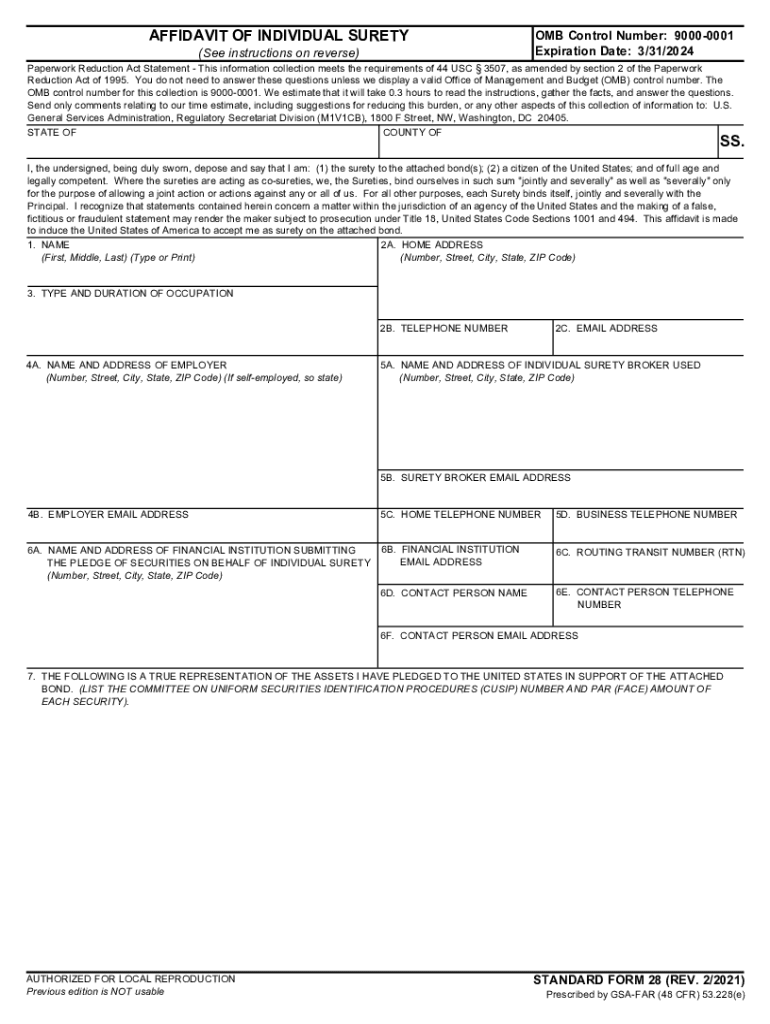
AFFIDAVIT OF INDIVIDUAL SURETY (See instructions on reverse)OMB Control Number: 90000001 Expiration Date: 3/31/2024Paperwork Reduction Act Statement This information collection meets the requirements.
Loading

Open form follow the instructions

Easily sign the form with your finger

Send filled & signed form or save
How to fill out the GSA SF 28 online
The GSA SF 28, also known as the Affidavit of Individual Surety, is a critical document required for individuals acting as sureties on government contracts. This guide will help you navigate the process of filling out this form online accurately and efficiently.
Follow the steps to complete the GSA SF 28 online.
- Click ‘Get Form’ button to obtain the form and open it in the editor.
- Enter your full name in the designated field as it appears on legal documents. This includes your first, middle, and last name.
- Input your home address, including your street number, city, state, and ZIP code in the appropriate section.
- Provide your telephone number, ensuring it is the best number to reach you.
- Fill out the email address field with a valid email where you can receive notifications or communications.
- In the occupation section, detail your current job position and the duration of your employment.
- For the employer's details, enter the name and address of your employer or note if you are self-employed.
- Indicate the financial institution that is pledging securities on your behalf, providing their complete address and contact information.
- List the assets you have pledged to the United States with the respective CUSIP numbers and face amounts in the provided area.
- If applicable, identify any liens, judgments, or encumbrances on the pledged assets.
- Disclose any bonds pledged within the last three years related to the assets in question.
- Sign the document in the specified section. Remember, the signature must be original.
- Complete the notary section by providing the date the oath was administered and the information of the official administering the oath.
- Once everything is filled out, you can save changes, download, print, or share the form as needed.
Complete your GSA SF 28 form online today for a smoother submission process.
Experience a faster way to fill out and sign forms on the web. Access the most extensive library of templates available.
Related content
Notice: This form is intended for use by government contractors and contracting personnel...
Prescribed by GSA FAR (48 CFR) 53.243. FACILITY CODE. 9A. AMENDMENT OF SOLICIATION NO. 9B...
At the time of design, the GSA did not mandate LEED certification, and the building was...
Get answers to your most pressing questions about US Legal Forms API.
What is an SF 28?
The Standard Form (SF) 28, Affidavit of Individual Surety, is used by all executive agencies, including the Department of Defense, to obtain information from individuals wishing to serve as sureties to Government bonds.
What is consent to surety?
Consent of Surety is basically a confirmation from the bond surety that they support a particular action that could impact the bond, and more importantly, that could impact their liability. The owner, general contractor, or subcontractor may need Consent of Surety before they take certain actions.
Use professional pre-built templates to fill in and sign documents online faster. Get access to thousands of forms.
If you believe that this page should be taken down, please follow our DMCA take down process here.