Loading
Get Case Intake Form - Garretson Resolution Group
How it works
-

Open form follow the instructions
-

Easily sign the form with your finger
-

Send filled & signed form or save
How to fill out the Case Intake Form - Garretson Resolution Group online
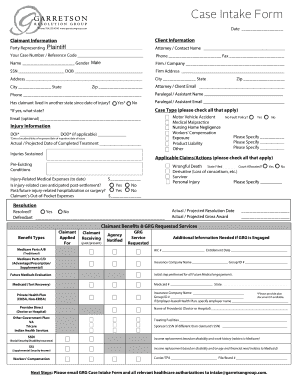
Completing the Case Intake Form for the Garretson Resolution Group can seem daunting, but this guide will walk you through each section clearly and efficiently. This document is essential for submitting your case information accurately and ensures your claims are processed without unnecessary delays.
Follow the steps to fill out the online form confidently.
- Click the ‘Get Form’ button to obtain the form and open it in the designated editor.
- Begin filling out the claimant information section. Enter the name of the plaintiff or the party representing them, along with your case number or reference code.
- Provide your contact information, including phone and fax numbers. Indicate the gender of the claimant and fill in their full name, Social Security Number, and date of birth.
- Complete the address fields with the claimant's primary address, including the city, state, and zip code.
- Select whether the claimant has lived in another state since the date of their injury by checking 'Yes' or 'No.' If 'Yes,' indicate which state.
- In the injury information section, check all applicable case types, such as motor vehicle accident or workers’ compensation. Include the date of injury and specify the injuries sustained.
- Specify any applicable claims or actions the claimant wishes to pursue, such as injury-related medical expenses.
- Provide financial details, including out-of-pocket expenses and any anticipated medical care post-settlement.
- Fill out the section regarding claimant benefits and services requested from GRG. Mention the types of benefits applied for and any previous notifications made.
- If applicable, provide additional information needed if GRG is engaged, including Medicaid or Medicare information.
- Review all filled information to ensure accuracy. Once confirmed, save changes, and download or print the form if necessary.
- Finally, ensure that you email the completed GRG Case Intake Form and all relevant healthcare authorizations to the specified email address.
Start completing your Case Intake Form online today for a smoother claims process.