Loading
Form preview
  • US Legal Forms
  • Form Library
  • More Forms
  • More Multi-State Forms
  • Employment Physical

Get Employment Physical

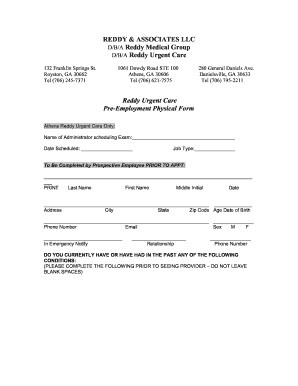
Are you currently under the treatment or care of a physician, Nurse Practitioner or other health care provider? Have you been treated in the past year? (Circle) YES NO If YES, Please explain:.

How it works

  1. Open form

    Open form follow the instructions

  2. Easily sign form

    Easily sign the form with your finger

  3. Share form

    Send filled & signed form or save

How to fill out the Employment Physical online

Filling out the Employment Physical form online is an important step for anyone preparing for a job. This guide will provide you with clear and concise instructions to help you complete the form accurately and efficiently.

Follow the steps to successfully complete your Employment Physical online.

  1. Press the ‘Get Form’ button to acquire the Employment Physical form and open it in your preferred digital editing tool.
  2. In the first section, you will need to provide your personal details. Fill in your last name, first name, middle initial, date of birth, address, city, state, zip code, age, phone number, email, and sex.
  3. You will be prompted to indicate an emergency contact. Provide their name, relationship to you, and their phone number in the designated areas.
  4. Review the list of medical conditions. For each condition listed, mark the appropriate response: 'Yes', 'No', or 'Don't Know'. Be sure to answer truthfully and completely.
  5. If you have ever been hospitalized, indicate 'Yes' and proceed to provide the name of the hospital, the condition treated, and the relevant dates.
  6. Continue to answer additional health-related questions regarding your history of treatments, smoking, alcohol consumption, and any medications you are currently taking.
  7. You must note your last tetanus shot and whether you have received a Hepatitis B vaccination. If you have, include the date.
  8. Provide your primary healthcare provider's name and contact information in the specified fields.
  9. Read the permission statement and ensure you understand it. Then print your name, sign, and date the form at the bottom.
  10. Once you have completed the form, review all information for accuracy. Save your changes, download the form if needed, and prepare to submit it electronically or print it for physical submission.

Complete your Employment Physical online now to ensure a smooth hiring process.

Get form

Experience a faster way to fill out and sign forms on the web. Access the most extensive library of templates available.
Get form

Related content

Physical Therapists : Occupational Outlook...
On-the-job Training, None. Number of Jobs, 2019, 258,200. Job Outlook, 2019-29, 18% (Much...
Learn more
Pre-Employment Physical Exams | Human Resources
Policies and Procedures Manual Section 3 All candidates for Western Michigan University...
Learn more
Social Determinants of Health - Healthy People...
Racism, discrimination, and violence; Education, job opportunities, and income; Access to...
Learn more

Related links form

Accomplish Defensible Space Around Structures Building Permit Application - Wahkiakum County Affidavit For Designation Of A Beneficiary Or ... - Tuscarawas County Regulations To Provide Public Access To Public Records (RCW 42

Questions & Answers

Get answers to your most pressing questions about US Legal Forms API.

Contact support

A: In California, employers are generally responsible for the costs associated with pre-employment physicals and background checks. However, some employers may request that the candidate pay for these costs, but this is not a common practice.

Six Tips to Prepare for Your Annual Physical Schedule an Appointment. Fasting Before Physical. List of Medications. Bring Results of Medical Tests. Bring a Current List of your Immunizations. Be Assured that Your Wellness Visit is Confidential.

If you are required to have a commercial driver license as part of your job, your employer shall pay the cost of the examination unless it was taken before you applied for the job (Labor Code §231).

In California, an employer may require an applicant to take a medical exam AFTER an offer of employment has been made. It is legal to condition the job offer on the results of the exam, provided the following factors are met: The exam must be job related and consistent with business necessity.

Laws About Meetings and Training Time in California In the state of California, if you're required to attend a meeting or get specific training, you are supposed to be paid for that time.

They help ensure that the employee is healthy and able to do the job. They also help to identify any health risks that the employee may have. If you are offered a job, be sure to ask about the pre-employment physical to be prepared.

or pre-em·ploy·ment being required or accomplished before an employee begins a new job: a preemployment medical exam. noun. the period of testing, processing, etc., before the start of employment.

A thorough physical examination covers head to toe and usually lasts about 30 minutes. It measures important vital signs -- temperature, blood pressure, and heart rate -- and evaluates your body using observation, palpitation, percussion, and auscultation.

Get This Form Now!

Use professional pre-built templates to fill in and sign documents online faster. Get access to thousands of forms.
Get form
If you believe that this page should be taken down, please follow our DMCA take down processhere.
Get Employment Physical
Get form
  • Adoption
  • Bankruptcy
  • Contractors
  • Divorce
  • Home Sales
  • Employment
  • Identity Theft
  • Incorporation
  • Landlord Tenant
  • Living Trust
  • Name Change
  • Personal Planning
  • Small Business
  • Wills & Estates
  • Packages A-Z
  • Affidavits
  • Bankruptcy
  • Bill of Sale
  • Corporate - LLC
  • Divorce
  • Employment
  • Identity Theft
  • Internet Technology
  • Landlord Tenant
  • Living Wills
  • Name Change
  • Power of Attorney
  • Real Estate
  • Small Estates
  • Wills
  • All Forms
  • Forms A-Z
  • Form Library
  • Legal Hub
  • About Us
  • Help Portal
  • Legal Resources
  • Blog
  • Affiliates
  • Contact Us
  • Delete My Account
  • Site Map
  • Industries
  • Forms in Spanish
  • Localized Forms
  • State-specific Forms
  • Forms Kit
  • Real Estate Handbook
  • All Guides
  • Notarize
  • Incorporation services
  • For Consumers
  • For Small Business
  • For Attorneys
  • USLegal
  • FormsPass
  • pdfFiller
  • signNow
  • altaFlow
  • DocHub
  • Instapage
Form Packages
  • Adoption
  • Bankruptcy
  • Contractors
  • Divorce
  • Home Sales
  • Employment
  • Identity Theft
  • Incorporation
  • Landlord Tenant
  • Living Trust
  • Name Change
  • Personal Planning
  • Small Business
  • Wills & Estates
  • Packages A-Z
Form Categories
  • Affidavits
  • Bankruptcy
  • Bill of Sale
  • Corporate - LLC
  • Divorce
  • Employment
  • Identity Theft
  • Internet Technology
  • Landlord Tenant
  • Living Wills
  • Name Change
  • Power of Attorney
  • Real Estate
  • Small Estates
  • Wills
  • All Forms
  • Forms A-Z
  • Form Library
Customer Service
  • Legal Hub
  • About Us
  • Help Portal
  • Legal Resources
  • Blog
  • Affiliates
  • Contact Us
  • Delete My Account
  • Site Map
  • Industries
  • Forms in Spanish
  • Localized Forms
  • State-specific Forms
  • Forms Kit
Legal Guides
  • Real Estate Handbook
  • All Guides
Prepared for you
  • Notarize
  • Incorporation services
Our Customers
  • For Consumers
  • For Small Business
  • For Attorneys
Our Sites
  • USLegal
  • FormsPass
  • pdfFiller
  • signNow
  • altaFlow
  • DocHub
  • Instapage
Social Media
Call us now toll free:
+1 833 426 79 33
As seen in:
© Copyright 1999-2026 airSlate Legal Forms, Inc. 3720 Flowood Dr, Flowood, Mississippi 39232
  • Your Privacy Choices
  • Terms of Service
  • Privacy Notice
  • Content Takedown Policy
  • Bug Bounty Program