Loading
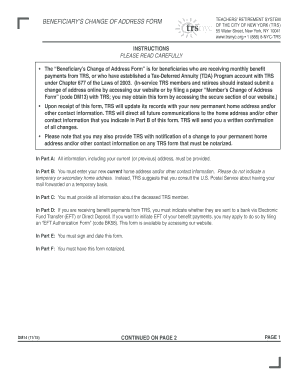
Get Beneficiary's Change Of Address Form (code Dm14). Form - Trsnyc
How it works
-

Open form follow the instructions
-

Easily sign the form with your finger
-

Send filled & signed form or save
How to fill out the Beneficiary's Change Of Address Form (code DM14). Form - Trsnyc online
This guide provides users with clear and concise instructions for completing the Beneficiary's Change Of Address Form (code DM14). It is designed to help ensure that the form is filled out accurately, facilitating timely updates to your address records with TRS.
Follow the steps to effectively complete your form.
- Press the ‘Get Form’ button to obtain the form and open it in your editing tool.
- In Part A, enter all required information including your full name, previous permanent address, and phone number. If any details are preprinted, verify that they are correct.
- In Part B, provide your new permanent home address and any additional contact information. Ensure this is your current address and not a temporary one.
- In Part C, fill out the information pertaining to the deceased TRS member. This may include their full name and social security number.
- In Part D, indicate whether your benefit payments are sent via Electronic Fund Transfer (EFT) or Direct Deposit by marking the appropriate option.
- In Part E, sign and date the form, affirming that the information you provided is accurate and represents your new contact details.
- In Part F, the notary section must be completed. Ensure it is notarized, as this is a requirement for the submission of the form.
- After completing the form, you can save your changes, download, print, or share the form as needed.
Complete your Beneficiary's Change Of Address Form online to ensure your information is updated promptly.
Click “Beneficiary Summary” under My Beneficiaries on your home page. Click “Change Information or Add New Beneficiary” button at the bottom of the page. Click "Add a New Beneficiary." Enter the beneficiary's personal data (Social Security number and date of birth are required).
Industry-leading security and compliance
US Legal Forms protects your data by complying with industry-specific security standards.
-
In businnes since 199725+ years providing professional legal documents.
-
Accredited businessGuarantees that a business meets BBB accreditation standards in the US and Canada.
-
Secured by BraintreeValidated Level 1 PCI DSS compliant payment gateway that accepts most major credit and debit card brands from across the globe.