Loading
Get Il Ar 9.10 2014-2026
How it works
-

Open form follow the instructions
-

Easily sign the form with your finger
-

Send filled & signed form or save
How to fill out the IL AR 9.10 online
Filling out the IL AR 9.10 form for a refund can seem daunting, but with the right guidance, it becomes a straightforward process. This guide will provide clear steps on completing the form online to ensure your request is submitted accurately.
Follow the steps to complete the IL AR 9.10 form online
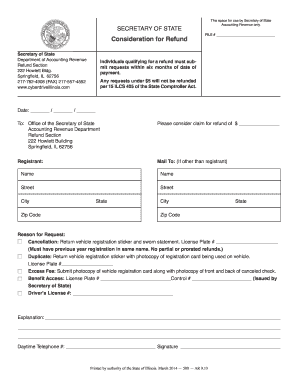
- Click ‘Get Form’ button to obtain the form and open it in the form editor.
- Fill in the date of your request in the format: month/day/year.
- Indicate the amount you are requesting for a refund by filling in the blank next to 'Please consider claim for refund of $ _______________'.
- Provide the registrant's name and mailing address. If the mailing address differs from the registrant, fill out the alternate 'Mail To' section with the recipient's details.
- Select the reason for your refund request by checking the appropriate box. Provide any required supporting details, such as the license plate number or any photocopies that may be necessary.
- In the 'Explanation' section, provide a brief but clear reason for your refund request, detailing any relevant information.
- Fill in your daytime telephone number for any follow-up communication regarding your request.
- Sign the form to validate your request. Ensure your signature matches the details provided.
- After completing all required fields, save your changes. You can download, print, or share the form as needed to submit your request.
Start filling out the IL AR 9.10 form online to submit your refund request today.
To correctly fill out a W9 form, provide complete and accurate information, including your name, business name (if any), address, and Tax Identification Number. Be sure to mark the right box indicating whether you are an individual or a business entity. This process is crucial for fulfilling IL AR 9.10 requirements and ensuring proper tax reporting.