Loading
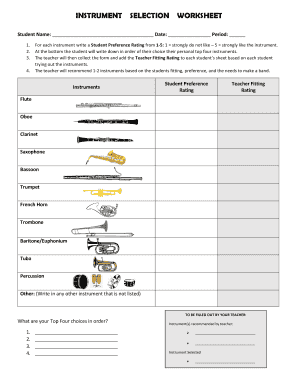
Get Instrument Selection Worksheet - Gladesbandmiami.com
How it works
-

Open form follow the instructions
-

Easily sign the form with your finger
-

Send filled & signed form or save
How to use or fill out the INSTRUMENT SELECTION WORKSHEET - Gladesbandmiami.com online
Filling out the instrument selection worksheet is a straightforward process that helps students express their preferences for musical instruments. This guide will walk you through each section, ensuring a seamless experience in making your selections.
Follow the steps to complete the instrument selection worksheet.
- Click the ‘Get Form’ button to access the instrument selection worksheet and open it in your preferred editing tool.
- Begin by entering your name in the designated space labeled 'Student Name.' Ensure that this is spelled correctly for proper identification.
- In the 'Instruments' section, review the list of available instruments. For each instrument listed, provide a Student Preference Rating from 1 to 5, where 1 means 'strongly do not like' and 5 means 'strongly like'.
- Once you have rated each instrument, write down your top four instrument choices in order of preference at the bottom of the form.
- After completing your preferences, submit the form to your teacher, who will then provide their Teacher Fitting Rating based on the instruments you tried.
- The teacher will recommend 1 to 2 instruments based on your fitting and preferences. Ensure that you record these recommendations in the specified area.
- Finally, in the 'Instrument Selected' section, fill in your chosen instrument as confirmed with your teacher.
- Once all sections are complete, make sure to save your changes, download a copy for your records, print it out if needed, or share it with your teacher as instructed.
Ready to express your musical preferences? Complete the instrument selection worksheet online today!