Loading
Get Client Declaration Form - Hurford Parker Insurance Brokers
How it works
-

Open form follow the instructions
-

Easily sign the form with your finger
-

Send filled & signed form or save
How to fill out the Client Declaration Form - Hurford Parker Insurance Brokers online
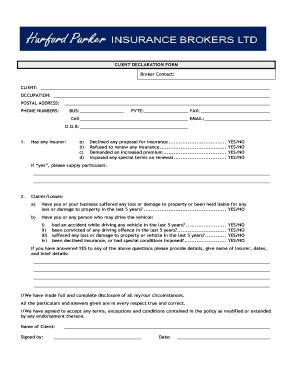
Filling out the Client Declaration Form for Hurford Parker Insurance Brokers online is a straightforward process that ensures you provide accurate information for your insurance needs. This guide will walk you through each step to help you complete the form efficiently and effectively.
Follow the steps to fill out your Client Declaration Form online.
- Press ‘Get Form’ button to access and open the Client Declaration Form in the editor.
- Begin by entering your full name in the 'CLIENT' field. This should be your legal name as it appears on identification documents.
- Fill in your occupation in the designated section. Be specific about your job title or role.
- Provide your postal address, ensuring that all lines are filled out correctly for effective communication.
- Enter your phone numbers, including your business, private, fax, and cell numbers. Make sure each number is current.
- Fill in your email address for correspondence related to your insurance.
- In the Date of Birth section, accurately enter your date of birth using the format requested.
- Continue to the questions section regarding your insurance history. For each question, select 'YES' or 'NO' as applicable. If you answer 'YES' to any questions, provide detailed particulars as requested.
- Diligently answer the claims/losses section, indicating any accidents or losses from the past five years. Again, provide details if your answer is 'YES'.
- At the end of the form, confirm your understanding and agreement by signing and dating the declaration. This indicates that all the information you have provided is true and complete.
- Finally, review the entire form for accuracy, and once satisfied, you can either save the changes, download, print, or share the completed form.
Complete your forms online to ensure a smooth and efficient process.