Loading
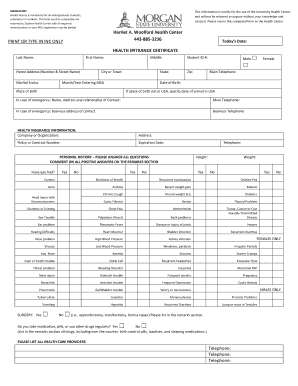
Get Health Entrance Certificate - Morgan State University - Morgan
How it works
-

Open form follow the instructions
-

Easily sign the form with your finger
-

Send filled & signed form or save
How to fill out the Health Entrance Certificate - Morgan State University - Morgan online
Completing the Health Entrance Certificate is essential for all undergraduate students at Morgan State University. This guide provides a clear and step-by-step approach to effectively fill out the form online, ensuring all necessary health information is accurately documented.
Follow the steps to successfully complete your Health Entrance Certificate online.
- Click ‘Get Form’ button to access the Health Entrance Certificate form. This will lead you to the document that you need to fill out.
- Start by entering your today’s date at the top of the form. This timestamp ensures the document is current.
- Fill in your personal details: last name, first name, middle name, and student ID number in the designated fields.
- Indicate your gender by selecting the appropriate box. Remember to select 'Male' or 'Female' as applicable.
- Provide your home address, including the street name, city or town, state, and zip code in the fields provided.
- Enter your main telephone number and date of birth, along with the place of birth, in the next section.
- Include details about your emergency contact, mentioning their name, address, relationship to you, and telephone numbers.
- In the health insurance information section, provide details of your insurance company, policy number, expiration date, and telephone number.
- Respond to all questions in the personal history section, indicating 'Yes' or 'No' for each health condition listed. Be prepared to add comments for any positive answers in the remarks section.
- Complete the social history section by indicating your current and past activity levels regarding smoking, alcohol consumption, exercise, and recreational drug use.
- Document your mandatory immunizations with relevant dates in the section provided. Ensure this has been verified by your health care provider.
- Fill out the family history section with the required details about your parents and siblings, ensuring to list any medical conditions that run in your family.
- Address any allergies, disabilities, or prior treatments in the designated sections. This will ensure your health needs are adequately understood.
- Review all entries for accuracy. Once satisfied, sign the form to confirm that all information is truthful to the best of your knowledge.
- Obtain the necessary signatures from healthcare staff and, if you're a minor, ensure a parent or guardian has signed the parental consent section.
- Finalize your form by saving your changes. You may then download, print, or share it as needed before submission.
Complete your Health Entrance Certificate online today to ensure a smooth registration process at Morgan State University.
ing to the US News and World reports, Morgan is ranked #15 among HBCUs and #185 in Best Undergraduate Engineering Programs.
Industry-leading security and compliance
US Legal Forms protects your data by complying with industry-specific security standards.
-
In businnes since 199725+ years providing professional legal documents.
-
Accredited businessGuarantees that a business meets BBB accreditation standards in the US and Canada.
-
Secured by BraintreeValidated Level 1 PCI DSS compliant payment gateway that accepts most major credit and debit card brands from across the globe.