Loading
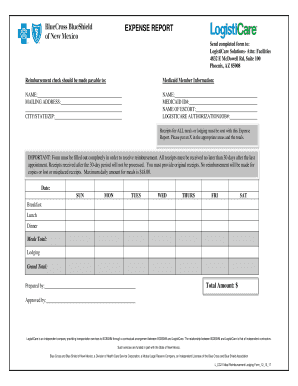
Get Facilityinfo Logisticare Com
How it works
-

Open form follow the instructions
-

Easily sign the form with your finger
-

Send filled & signed form or save
How to fill out the Facilityinfo Logisticare Com online
Filling out the Facilityinfo Logisticare Com form is a straightforward process that can help ensure you receive reimbursement for eligible expenses. This guide will provide step-by-step instructions to assist you in completing the form accurately and efficiently.
Follow the steps to successfully complete your expense report
- Click 'Get Form' button to access the form and open it in the online editor.
- Provide your Medicaid member information. Fill in the 'Name' and 'Mailing Address' fields accurately. Ensure that all information is current to facilitate communication and reimbursement processing.
- Complete the 'Medicaid ID#' section and provide the name of your escort, if applicable. Additionally, note the Logisticare Authorization/Job# to link your expenses to authorized services.
- Fill in the 'City/State/Zip' information accurately, as this helps confirm your residency for Medicaid eligibility.
- Document all relevant expenses. For meal reimbursements, indicate the totals for breakfast, lunch, and dinner for each day as prompted, and write down the total meals amount.
- Similarly, record lodging expenses, if applicable, and calculate the Grand Total of all reimbursements requested.
- In the 'Total Amount' field, ensure you sum up all expenses accurately to avoid any processing delays.
- Include your name in the 'Prepared by' section and the name of the approver in the respective field.
- Review all provided information for accuracy. Remember that complete forms are necessary for reimbursement, and original receipts must be attached.
- Finally, save your changes, and choose to download, print, or share the completed form as needed.
Complete your expense report online today to ensure timely reimbursement.
The Modivcare App makes it easy to book a ride for your doctor visit. Members with the app can book and manage trips from a smartphone. You can download the Modivcare App from Google Play® or the Apple App Store®.