Loading
Form preview
  • US Legal Forms
  • Form Library
  • More Forms
  • More Multi-State Forms
  • Form 12a

Get Form 12a

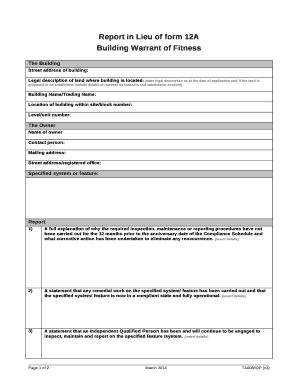
Report in Lieu of form 12A Building Warrant of FitnessThe Building Street address of building:Legal description of land where building is located: state legal description as at the date of application.

How it works

  1. Open form

    Open form follow the instructions

  2. Easily sign form

    Easily sign the form with your finger

  3. Share form

    Send filled & signed form or save

How to fill out the Form 12a online

Filling out Form 12a online can streamline the process of documenting your building's compliance and maintenance procedures. This guide provides clear, step-by-step instructions for successfully completing each section of this important form.

Follow the steps to efficiently fill out the Form 12a online.

  1. Click ‘Get Form’ button to obtain the form and launch it in the online editor.
  2. Provide the building information in the designated fields. Include the street address, legal description of the land, building name or trading name, location within the site, and level or unit number.
  3. Enter the owner's details, including the name of the owner, contact person, mailing address, and registered office street address.
  4. Detail the specified systems or features of the building that are relevant to the compliance schedule.
  5. In the report section, provide a full explanation of why inspection and maintenance procedures were not completed in the last year and what corrective actions have been taken to prevent recurrence.
  6. State that all necessary remedial work on the specified system or feature has been completed, confirming that it is compliant and operational.
  7. Include a statement that an Independent Qualified Person has been engaged to inspect, maintain, and report on the specified systems or features.
  8. Confirm that ongoing inspection, maintenance, and reporting procedures will be implemented to allow for the issuance of a Form 12a certificate in the future.
  9. Attach supporting documentation from the Independent Qualified Person for the assertions made previously in the report.
  10. Sign the report in the designated area, ensuring that the owner's signature is included, or indicate if it is an agent or IQP signing on behalf of the owner.
  11. Finally, confirm the submission information by having the IQP sign and provide their identification number, company name, and the date of submission.

Complete your Form 12a online today to ensure timely compliance and maintenance documentation.

Get form

Experience a faster way to fill out and sign forms on the web. Access the most extensive library of templates available.
Get form

Related content

WORKERS COMPENSATION – FIRST REPORT OF INJURY...
WCC FORM 12A. REV. DATE 04/06. SEE INSTRUCTIONS FOR IMPORTANT INFORMATION. REPRINTED WITH...
Learn more
Application form 12A 2014 | pushpak vodapally...
Application form 12A 2014. Pushpak Vodapally....
Learn more
2017 General Instructions for Forms W-2 and W-3
May 2, 2017 — file Forms W-2 with the SSA for more information. This ... amount in box...
Learn more

Related links form

Gray, CPA, Chair - Ok Application For Renewal Of Permit To Build An Abstract Plant - Ok OPM 00-19 DATE: March 21, 2000 TO: All Appointing Authorities ... - Ok No-till Oklahoma Conference - State Of Oklahoma - Ok

Questions & Answers

Get answers to your most pressing questions about US Legal Forms API.

Contact support

The coming and going rule holds that injuries suffered by an employee on the way to the workplace or on the way home are generally not compensable because the injured worker is not “on the clock” when the accidental injury takes place.

File a claim by filling out and submitting Form 50 (in case of work-related injuries) or Form 52 (in case of work-related death) to the Commission. Request a hearing by indicating this desire on the claim form (Line 13b on Form 50 or Line 12b on Form 52).

While the South Carolina Workers' Compensation Commission (SCWCC) gives you 90 days to report your injury or illness to your employer and two years to file a claim for workers' comp benefits, you definitely should not wait to do either.

SC Workers' Compensation laws are designed to pay for your medical care, the time you miss from work, and your permanent degree of injury. After suffering an on-the-job injury, you should immediately notify your supervisor/employer. If you think medical treatment is necessary, you should ask to be sent to the doctor.

Filing a workers' compensation claim in South Carolina is a multi-step process. First, you must notify your employer of your injuries. Next, you must file a Form 50 or Form 52 with the South Carolina Workers' Compensation Commission.

Get This Form Now!

Use professional pre-built templates to fill in and sign documents online faster. Get access to thousands of forms.
Get form
If you believe that this page should be taken down, please follow our DMCA take down processhere.

Industry-leading security and compliance

US Legal Forms protects your data by complying with industry-specific security standards.
  • In businnes since 1997
    25+ years providing professional legal documents.
  • Accredited business
    Guarantees that a business meets BBB accreditation standards in the US and Canada.
  • Secured by Braintree
    Validated Level 1 PCI DSS compliant payment gateway that accepts most major credit and debit card brands from across the globe.
Get Form 12a
Get form
  • Adoption
  • Bankruptcy
  • Contractors
  • Divorce
  • Home Sales
  • Employment
  • Identity Theft
  • Incorporation
  • Landlord Tenant
  • Living Trust
  • Name Change
  • Personal Planning
  • Small Business
  • Wills & Estates
  • Packages A-Z
  • Affidavits
  • Bankruptcy
  • Bill of Sale
  • Corporate - LLC
  • Divorce
  • Employment
  • Identity Theft
  • Internet Technology
  • Landlord Tenant
  • Living Wills
  • Name Change
  • Power of Attorney
  • Real Estate
  • Small Estates
  • Wills
  • All Forms
  • Forms A-Z
  • Form Library
  • Legal Hub
  • About Us
  • Help Portal
  • Legal Resources
  • Blog
  • Affiliates
  • Contact Us
  • Delete My Account
  • Site Map
  • Industries
  • Forms in Spanish
  • Localized Forms
  • State-specific Forms
  • Forms Kit
  • Real Estate Handbook
  • All Guides
  • Notarize
  • Incorporation services
  • For Consumers
  • For Small Business
  • For Attorneys
  • USLegal
  • FormsPass
  • pdfFiller
  • signNow
  • altaFlow
  • DocHub
  • Instapage
Form Packages
  • Adoption
  • Bankruptcy
  • Contractors
  • Divorce
  • Home Sales
  • Employment
  • Identity Theft
  • Incorporation
  • Landlord Tenant
  • Living Trust
  • Name Change
  • Personal Planning
  • Small Business
  • Wills & Estates
  • Packages A-Z
Form Categories
  • Affidavits
  • Bankruptcy
  • Bill of Sale
  • Corporate - LLC
  • Divorce
  • Employment
  • Identity Theft
  • Internet Technology
  • Landlord Tenant
  • Living Wills
  • Name Change
  • Power of Attorney
  • Real Estate
  • Small Estates
  • Wills
  • All Forms
  • Forms A-Z
  • Form Library
Customer Service
  • Legal Hub
  • About Us
  • Help Portal
  • Legal Resources
  • Blog
  • Affiliates
  • Contact Us
  • Delete My Account
  • Site Map
  • Industries
  • Forms in Spanish
  • Localized Forms
  • State-specific Forms
  • Forms Kit
Legal Guides
  • Real Estate Handbook
  • All Guides
Prepared for you
  • Notarize
  • Incorporation services
Our Customers
  • For Consumers
  • For Small Business
  • For Attorneys
Our Sites
  • USLegal
  • FormsPass
  • pdfFiller
  • signNow
  • altaFlow
  • DocHub
  • Instapage
Social Media
Call us now toll free:
+1 833 426 79 33
As seen in:
© Copyright 1999-2026 airSlate Legal Forms, Inc. 3720 Flowood Dr, Flowood, Mississippi 39232
  • Your Privacy Choices
  • Terms of Service
  • Privacy Notice
  • Content Takedown Policy
  • Bug Bounty Program