Loading
Get St. Lucie Public Schools Xed0236
How it works
-

Open form follow the instructions
-

Easily sign the form with your finger
-

Send filled & signed form or save
How to fill out the St. Lucie Public Schools XED0236 online
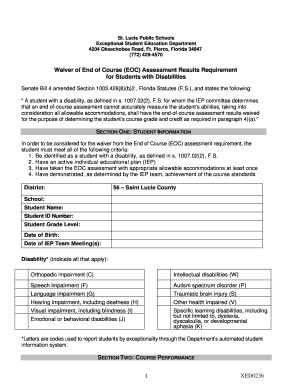
Filling out the St. Lucie Public Schools XED0236 form is an important step in obtaining a waiver for the End of Course Assessment results for students with disabilities. This guide provides clear instructions to help users complete the form accurately and efficiently.
Follow the steps to successfully complete the XED0236 form.
- Press the ‘Get Form’ button to access the form and open it in your online editor.
- Begin by completing Section One, which requires student information. Fill in details such as the district (Saint Lucie County), school name, student’s name, student ID number, grade level, date of birth, date of IEP team meeting(s), and the types of disabilities applicable to the student.
- Move to Section Two to provide course performance details. Enter the course code, course title, EOC assessment score, date of administration, and the course grade of the student. Attach a copy of the student’s IEP that indicates the accommodations provided during the assessment.
- In Section Three, the IEP team will review relevant information. Check ‘yes’ or ‘no’ for each item reviewed, such as the individual education plan, classroom performance, and academic history. Indicate whether the student has taken the EOC assessment with appropriate accommodations and whether they have earned a passing score. Provide explanations where necessary.
- Continue completing Section Three by addressing why the EOC assessment may not accurately reflect the student's abilities. Check the relevant boxes and provide detailed descriptions as needed.
- Confirm in Section Four whether the IEP team agrees that the passing score requirement should be waived. Make sure to respond to any additional questions regarding notification of the district’s obligations for providing a free appropriate public education.
- Finally, gather all signatures in the designated area at the bottom of the form. Ensure all required personnel, including the student, parent/guardian, teachers, and the LEA representative, provide their signatures and dates.
- Save the completed form and all required attachments. Download or print a copy for your records, and ensure the form is filed in the student’s cumulative folder.
Complete your documents online today to ensure timely processing.
The St. Lucie Public Schools district earned a B, and outperformed all Treasure Coast Districts moving from 28th to 24th in state district rankings for overall performance. St Lucie Public Schools has no failing schools despite the challenges of the last several years.