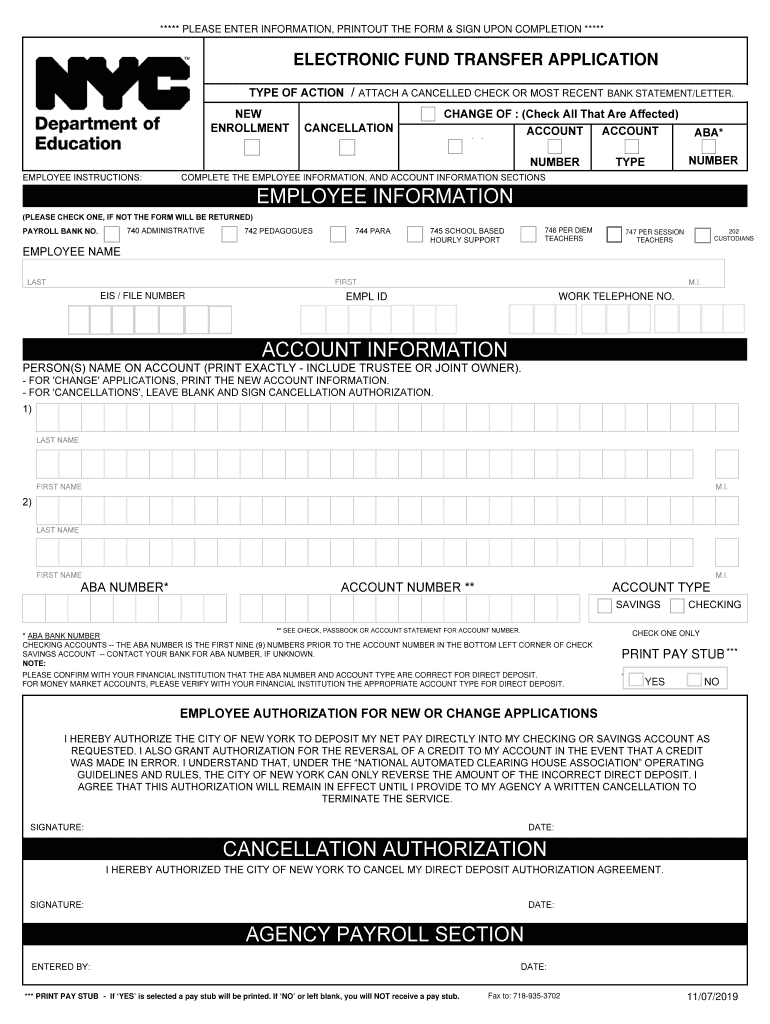
***** PLEASE INFORMATION, PRINTOUT THE FORM SIGN UPON ***** ENTER PLEASE PRINT CLEARLY IN CAPS WITH&BLACK INK COMPLETION PEN ***** *****New York City Department of Education ELECTRONIC FUND TRANSFER.
Loading

Open form follow the instructions

Easily sign the form with your finger

Send filled & signed form or save
How to fill out the NY DOE Electronic Fund Transfer Application online
The NY DOE Electronic Fund Transfer Application is essential for facilitating direct deposit of salary payments. This guide will provide step-by-step instructions on how to complete the application online efficiently and accurately.
Follow the steps to complete your application online.
- Click 'Get Form' button to access the electronic version of the NY DOE Electronic Fund Transfer Application.
- Begin by selecting the type of action you wish to undertake: new enrollment, cancellation, or change of account option. Ensure you attach a cancelled check or your most recent bank statement as required.
- Fill out the employee information section. Please check one of the employment types, including administrative, pedagogues, para, school-based hourly support, or per diem teachers, to avoid having your form returned.
- Provide your full name, including your last name, first name, middle initial, employee file number, social security number, employee ID, and work telephone number. Ensure this information is printed clearly.
- In the account information section, print the name of the person or persons on the account exactly as it appears on your bank records. For changes, include new account information accordingly.
- Enter the ABA number, which can be found on the bottom left corner of your check or by contacting your financial institution. Confirm the ABA number and account type with your bank to ensure accuracy for direct deposit.
- For account type, select either 'savings' or 'checking.' Remember to verify that your account type is compatible with direct deposit as advised by your bank.
- Review the employee authorization statement. If you agree, provide your signature and the date, acknowledging that you authorize New York City to deposit your net pay directly into your chosen account.
- If you are processing a cancellation, sign the cancellation authorization section and provide the date.
- After reviewing your application for accuracy, you may save changes, download, print, or share the completed form as necessary.
Start filling out your NY DOE Electronic Fund Transfer Application online today.
Experience a faster way to fill out and sign forms on the web. Access the most extensive library of templates available.
Related content
Direct Deposit Enrollment. Enjoy the many benefits of direct deposit. Choose the...
RETURN COMPLETED FORM TO YOUR AGENCY/DEPARTMENT PAYROLL OR PERSONNEL OFFICE ... operate...
Western Governors University Affordable online degrees in New York. ... have to apply and...
Get answers to your most pressing questions about US Legal Forms API.
How do I access the NYC DoE payroll portal?
First type the web address https://payrollportal.nycboe.net in your browser. This will take you directly to the DoE's Payroll Portal. On the far left locate “login” and click on it once. Enter the appropriate information as follows: Network/Email ID, Password and choose and enter your SS, EIS ID or Employee ID.
How can I receive a direct deposit?
Here's the process you will follow to get your own direct deposit payments: Fill out the direct deposit form. ... Include your account information. ... Deposit amount. ... Attach a voided check or deposit slip. ... Submit the form.
How do I set up direct deposit on my pay?
myPay Go to the myPay web site, and log into your account using the login box at the top right-hand side of your screen. Click Accept on the Terms of Use Agreement. On the Main Menu Page, find the Direct Deposit link. Enter your Routing Number, your account number, account type and financial institution.
What is the form of electronic funds transfer?
EFTs include, but are not limited to: Automated teller machine (ATM) transfers. Direct deposit payment or withdrawals of funds initiated by the payer. Direct debit payments in which a business debits the consumer's bank accounts for payment for goods or services.
How do I get direct deposit for NYC DOE?
The fastest way to enroll in Direct Deposit is through NYCAPS Employee Self-Service (ESS). Alternately, you can print, complete the Direct Deposit Enrollment form and submit to your agency's payroll department.
What is the NYC DoE direct deposit phone number?
718-935-2200 (Monday-Friday, 8 a.m.- 6 p.m.)
Use professional pre-built templates to fill in and sign documents online faster. Get access to thousands of forms.
If you believe that this page should be taken down, please follow our DMCA take down process here.