Loading
Get Nj Bc-502 2021-2026
How it works
-

Open form follow the instructions
-

Easily sign the form with your finger
-

Send filled & signed form or save
How to fill out the NJ BC-502 online
Filling out the NJ BC-502 form for direct deposit of benefit payments is a straightforward process. This guide will provide you with step-by-step instructions to ensure that you can complete the form correctly and efficiently.
Follow the steps to complete the NJ BC-502 form online.
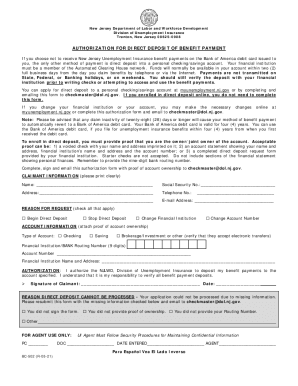
- Click ‘Get Form’ button to obtain the form and open it in the editor.
- Provide your personal information in the Claimant Information section, including your name, Social Security number, address, telephone number, and email address. Ensure that all details are accurate and clearly printed.
- In the Reason for Request section, check all applicable options. You can choose from options such as Begin Direct Deposit, Stop Direct Deposit, Change Financial Institution, or Change Account Number.
- Fill out the Account Information section by indicating the type of account (Checking, Savings, or Brokerage/Investment). Provide the financial institution's routing number (9 digits) and your account number. Attach proof of account ownership, which can be a voided check, account statement, or the direct deposit request form from your institution.
- Read the Authorization statement carefully. By signing this section, you are giving permission to the NJLWD to deposit your benefit payments into the specified account. Remember to understand your responsibility to verify your deposits.
- Sign and date the form in the designated area. Ensure your signature matches the name you provided earlier.
- Review the form for any missing information or errors. Once complete, save your changes, download, or print the form if needed.
- Email the completed form along with proof of account ownership to checkmaster@dol.nj.gov.
Complete your documents online for a smoother process.
If needed, you will be contacted by NJDOL and instructed to verify your identity through a specific weblink connected to ID.me. The process can be completed in a few minutes using the email address associated with your initial unemployment claim, a computer or mobile phone, and common pieces of documentation.