Loading
Get Seattle, Wa 98104-2608
How it works
-

Open form follow the instructions
-

Easily sign the form with your finger
-

Send filled & signed form or save
How to fill out the Seattle, WA 98104-2608 online
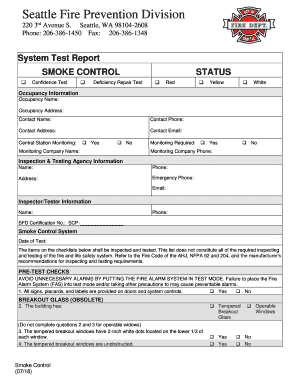
Completing the Seattle, WA 98104-2608 form online is an important step in ensuring compliance with local fire prevention regulations. This guide provides clear instructions to help users navigate through each section of the form effectively.
Follow the steps to complete the online form successfully.
- Click the ‘Get Form’ button to access the Seattle, WA 98104-2608 form and open it in your preferred document platform.
- Fill out the ‘Occupancy Information’ section. Provide the occupancy name and address, along with the contact person's name, phone number, address, and email. Ensure all mandatory fields marked with an asterisk are completed.
- In the ‘Central Station Monitoring’ section, indicate whether monitoring is required by checking ‘Yes’ or ‘No.’ If applicable, provide the monitoring company name and phone number.
- Complete the ‘Inspection & Testing Agency Information’ section with the required details, including agency name, phone number, address, emergency phone number, and email.
- In the ‘Inspector/Tester Information’ subsection, fill in the inspector or tester’s name, phone number, and SFD certification number.
- Specify the date of the smoke control system test in the appropriate field.
- Carefully address all items in the ‘Pre-Test Checks’ and ‘Smoke Removal General’ sections by responding ‘Yes’ or ‘No’ where indicated. Ensure any necessary comments or additional measurements are documented.
- For the ‘Stairway and Elevator Shaft Pressurization’ section, accurately provide all relevant measurements and confirm that all doors open and close correctly with fans operating.
- Complete the ‘Final Checks’ by confirming whether the report of all measurements taken is attached and whether the confidence test report was provided to the owner.
- Optionally, include the signature of the technician and the building representative if desired.
- Once all sections are filled out completely, save your changes, and proceed to download, print, or share the form as required.
Complete your fire prevention documents online today for efficient compliance.
Get form
Experience a faster way to fill out and sign forms on the web. Access the most extensive library of templates available.
Get This Form Now!
Use professional pre-built templates to fill in and sign documents online faster. Get access to thousands of forms.