Loading
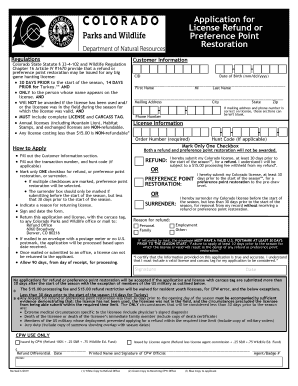
Get Co Parks & Wildlife Application For License Refund Or Preference Point Restoration 2019
How it works
-

Open form follow the instructions
-

Easily sign the form with your finger
-

Send filled & signed form or save
How to fill out the CO Parks & Wildlife Application For License Refund Or Preference Point Restoration online
Completing the CO Parks & Wildlife Application For License Refund Or Preference Point Restoration online is a straightforward process. This guide will take you step-by-step through each section of the application to ensure a smooth submission.
Follow the steps to successfully complete your application.
- Click ‘Get Form’ button to access the application and open it in your preferred editing program.
- Start by filling out the Customer Information section. Include your CID, date of birth in the format mm/dd/yyyy, first name, middle initial, last name, mailing address, city, state, and zip code. If the mailing address and phone number on your license are correct, you may leave those sections blank.
- Provide your phone number and license information, including the order number and hunt code if applicable.
- Mark only one checkbox indicating whether you are requesting a refund, preference point restoration, or surrender of your license. If you mark multiple boxes, preference point restoration will be selected by default.
- Specify the reason for the refund by marking the appropriate option, such as personal, family, employment, or other.
- Sign and date the application form to certify that the information provided is true and accurate. Ensure that your application includes the complete license and carcass tag.
- Return your application along with the license and carcass tag to any Colorado Parks and Wildlife office, or mail it to the Refund Office at the provided address. Ensure that if mailed, it has a valid U.S. postmark at least 30 days prior to the start of the season.
- Once your application has been submitted, be sure to allow up to 90 days for processing. Keep in mind that if you are submitting your application after the specified deadlines or without the required information, it may be denied.
- After completing the form, you may choose to save any changes, download or print it for your records, or share it as necessary.
Get started now to complete your application for a refund or preference point restoration online.
Get form
Experience a faster way to fill out and sign forms on the web. Access the most extensive library of templates available.
Get This Form Now!
Use professional pre-built templates to fill in and sign documents online faster. Get access to thousands of forms.
Industry-leading security and compliance
US Legal Forms protects your data by complying with industry-specific security standards.
-
In businnes since 199725+ years providing professional legal documents.
-
Accredited businessGuarantees that a business meets BBB accreditation standards in the US and Canada.
-
Secured by BraintreeValidated Level 1 PCI DSS compliant payment gateway that accepts most major credit and debit card brands from across the globe.