Loading
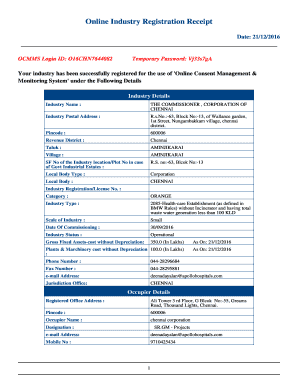
Get Ocmms Login
How it works
-

Open form follow the instructions
-

Easily sign the form with your finger
-

Send filled & signed form or save
How to fill out the Ocmms Login online
This guide provides a detailed overview of how to complete the Ocmms Login process online. By following these steps, users will be able to securely access the Online Consent Management & Monitoring System.
Follow the steps to successfully fill out the Ocmms Login form.
- Click ‘Get Form’ button to obtain the form and open it in the editor.
- Enter your OCMMS Login ID in the designated field. For this document, it is O16CHN7644082. Make sure to input it accurately to access your account.
- Input the temporary password provided in the document, which is Vj33s7gA. This password is only valid for 15 days, so be prepared to change it during your first login.
- Upon successfully logging in, change your password as prompted. Select a strong, secure new password to help protect your account from unauthorized access.
- Complete any additional verifications or security prompts as required by the system to ensure your account's safety.
- Once you have logged in and changed your password, you may proceed to use the system for its intended functions, including managing and monitoring consent.
- Finally, make sure to save your login credentials securely, and do not share them with others. Consider keeping a record of your new password separate from your electronic devices.
Complete your Ocmms Login online to effectively manage your industry registration.
Industry-leading security and compliance
US Legal Forms protects your data by complying with industry-specific security standards.
-
In businnes since 199725+ years providing professional legal documents.
-
Accredited businessGuarantees that a business meets BBB accreditation standards in the US and Canada.
-
Secured by BraintreeValidated Level 1 PCI DSS compliant payment gateway that accepts most major credit and debit card brands from across the globe.