Loading
Get Marquis Cinema 10
How it works
-

Open form follow the instructions
-

Easily sign the form with your finger
-

Send filled & signed form or save
How to fill out the Marquis Cinema 10 online
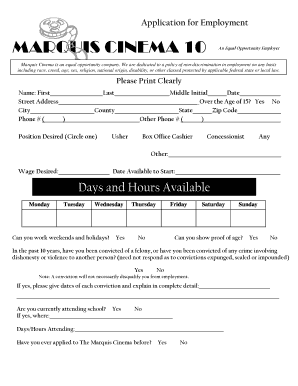
The Marquis Cinema 10 application form is essential for those seeking employment at this establishment. This guide provides comprehensive instructions on how to complete the form accurately and effectively, ensuring your application stands out.
Follow the steps to complete your application form with ease.
- Press the ‘Get Form’ button to access the application form and open it in your preferred online editor.
- Begin filling out the form with your personal information. Clearly print your name, including first and last names, and include your middle initial if applicable. Enter the date of your application.
- Provide your street address, city, county, state, and zip code. Make sure to double-check for accuracy.
- Indicate your phone number and any alternate phone number if available, ensuring that both are entered correctly.
- Select the position you are applying for by circling your choice. Options include Usher, Box Office Cashier, Concessionist, and 'Any'. You may also specify another position if applicable.
- Fill in your desired wage and the date you are available to start work.
- Indicate your availability by marking the days of the week you can work and whether you can work weekends or holidays.
- Respond to the question regarding proof of age by selecting 'Yes' or 'No'.
- Answer the felony conviction question honestly, providing details if applicable. Remember, a conviction does not automatically disqualify you.
- Indicate if you are currently attending school. If so, provide the name of the institution and your class schedule.
- Answer whether you have previously applied to the Marquis Cinema and provide details of your previous employment, including the company name, dates of employment, and reasons for leaving.
- If you are currently employed, indicate your willingness to allow contact with your current employer.
- Sign and date the authorization for former employers to release information about your employment history.
- Sign and date the Employment at Will Agreement to acknowledge your understanding of employment conditions.
- Review all entered information for accuracy before proceeding to save, download, or print your completed application.
Complete your application for employment at Marquis Cinema 10 online today!