Loading
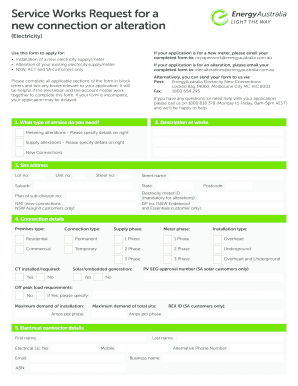
Get Energy Australia Service Works Request Form
How it works
-

Open form follow the instructions
-

Easily sign the form with your finger
-

Send filled & signed form or save
How to fill out the Energy Australia Service Works Request Form online
Filling out the Energy Australia Service Works Request Form is an essential step for users needing to connect or modify their electricity supply. This guide provides detailed, step-by-step instructions to help ensure a smooth process for your application.
Follow the steps to complete your Service Works Request Form
- Click ‘Get Form’ button to obtain the form and open it in the editor.
- Begin with the description of works section. Here, you need to indicate the type of service you require, such as metering alterations or new connections. Provide any specific details as required on the right side of the section.
- Fill in the site address. Include your lot number, unit number, street number, street name, suburb, state, and postcode. If applicable, provide the electricity meter ID and plan of subdivision number.
- Complete the connection details section. Select the premises type (residential or commercial), supply phase, connection type, meter phase, and installation type, while noting any other specific requirements such as CT installation or solar generation.
- Enter the electrical contractor details, including their first name, last name, email, mobile number, and business name. Ensure to provide their electrical license number and ABN.
- If you are a NSW customer, complete the Level 2 - Accredited service provider section with the respective details of the provider, including their first name, last name, mobile, and electrical license number.
- In the account holder details section, provide your title, first name, last name, driver’s license or Medicare number, date of birth, and relevant addresses. Include your mobile number, alternative phone number, email, ABN, and business name if applicable.
- Complete the acceptance section by signing and dating the form. If your premises are leased, include a letter of permission from the property owner or landlord.
- Finally, review all completed sections for accuracy. Ensure all information is filled in completely. You can then save changes, download, print, or share the form as necessary.
Complete your Electricity Service Works Request Form online today for a seamless connection or alteration process.
Related links form
OH Prevention Retention And Contingency Program (PRC) Application For Covid-19 - Sandusky County 2020
International Towing & Recovery Hall Of Fame & Museum Hall Of Fame Nomination Form 2023
CA CUPA Forum Tier II Qualified Facility SPCC Plan Template 2010
MO Neighborhood Tourist Development Fund 90-Day Final Report - City Of Kansas City 2019
Smart Meters enable a utility to provide customers with detailed information about their energy usage at different times of the day, which in turn enables customers to manage their energy use more proactively. Smart Meters are being rolled out nationwide and internationally.